PLC for Automatic Cutting Machine


See Animation : Cutting Machine
Animation Automatic Cutting Machine

Cutting Machine :
Cutting Machines

Detail Cutting Machine :
Detail Cutting Machines

Notes :
LS = Limit Switch.
LS 1 = Limit Switch for Cutter Reverse.
LS 2 = Limit Switch for Cutter Forward.
LS 3 = Limit Switch for Clamp1 (Fixed) Forward (Clamp).
LS 4 = Limit Switch for Clamp1 (Fixed) Reverse (UnClamp).
LS 5 = Limit Switch for Clamp2 (Movable) Forward (Clamp).
LS 6 = Limit Switch for Clamp2 (Movable) Reverse (UnClamp).
LS 7 = Limit Switch for Clamp2 (Movable) Forward.
LS 8 = Limit Switch for Clamp2 (Movable) Reverse.

See : LS or Limit Switch

Number Of Inputs and Output PLC applied :
1. Number Of Inputs PLC is 11 Input :
--- 1 Unit Input for Push Button Start.
--- 1 Unit Input for Push Button Emg / Emergency.
--- 1 Unit Input for Selector Switch Electric Motor ON.
--- 8 Unit Input for Limit Switch (LS).
--- Total Number Of Inputs PLC is Minimum 11 Input Unit.

2. Number Of Output PLC is 9 Output :
--- 1 Unit Output for Contactor. It's Functions to electrical Motor Cutter ( ON / OFF Motor ) .
--- 2 Unit Output for Solenoid Cylinder Cutter : Forward - Reverse.
--- 2 Unit Output for Solenoid Cylinder Clamp1 : Clamp - UnClamp .
--- 2 Unit Output for Solenoid Cylinder Clamp2 : Clamp - UnClamp.
--- 2 Unit Output for Solenoid Cylinder Clamp2 : Forward - Reverse.
--- Total Number Of Outputs PLC is Minimum 9 Output Unit.

See : Solenoid

Sequence PLC Programming for Cutting Machines :

Step 1 :
a. If Push Button Emg = OFF Then All System OFF.
b. If LS 1 = ON And LS 4 = ON And LS 6 = ON And LS 8 = ON Then All Limit Switch Origin = ON.
c. If Push Button Emg = ON And Selector Switch Motor = ( OFF to ON ) And All Limit Switch Origin = ON Then Contactor Motor = ON.

Step 2 :
a. If Push Button Start = ON And Contactor Motor = ON And All Limit Switch Origin = ON Then Starts Automatic Cutting Process.
--- Download Animation : Cutting Machine
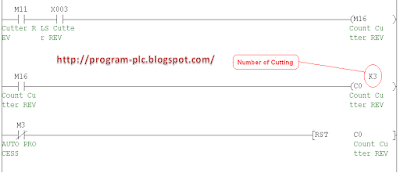
b. If have been three times ( Data Setting = 3 (Can be Changed) ) Then Stops Automatic Cutting Process And ALL Return Origin.
c. If Push Button Emg = Pulse ON Then ALL Return Origin.


Can You make Program Ladder PLC ?

If Can't :

PLC Omron Programming Cutting Machine

PLC Mitsubishi Programming Cutting Machine

PLC Keyence Programming Cutting Machine

Connect PNP or NPN Sensor to PLC Mitsubishi

Cable Function of Photoelectric Sensors :
Brown cable is connected to positive power supply
Blue cable is connected to negative power supply
Black cable is connected to Input PLC
Pink cable for Dark ON or Light ON or not used = Light ON

Sensor Output Specifications :
NPN Open-Collector Output
PNP Open-Collector Output

Connect NPN Sensor to Input PLC Mitsubishi
Connect NPN Sensor to PLC Mitsubishi

Connect PNP Sensor to Input PLC Mitsubishi
Connect PNP Sensor to PLC Mitsubishi

Connect PNP or NPN Sensor to PLC Keyence

Cable Function of Photoelectric Sensors :
Brown cable is connected to positive power supply
Blue cable is connected to negative power supply
Black cable is connected to Input PLC
Pink cable for Dark ON or Light ON or not used = Light ON

Sensor Output Specifications :
NPN Open-Collector Output
PNP Open-Collector Output

Connect NPN Sensor to Input PLC Keyence
Connect NPN Sensor to PLC Keyence

Connect PNP Sensor to Input PLC Keyence
Connect PNP Sensor to PLC Keyence

Connect PNP or NPN Sensor to PLC Omron

Cable Function of Photoelectric Sensors :
Brown cable is connected to positive power supply
Blue cable is connected to negative power supply
Black cable is connected to Input PLC
Pink cable for Dark ON or Light ON or not used = Light ON

Sensor Output Specifications :
NPN Open-Collector Output
PNP Open-Collector Output

Connect NPN Sensor to Input PLC Omron
Connect NPN Sensor to PLC Omron

Connect PNP Sensor to Input PLC Omron
Connect PNP Sensor to PLC Omron

Simulation How to Work Counter for PLC Omron

How to Work Counter With Scan PLC :

How to Work Counter Scan 1 :
Input 001.06 = OFF , Input 001.07 = OFF , Present Value (PV) Counter = 2 and CNT000 = OFF.

How to Work Counter plc Omron scan 1

How to Work Counter Scan 2 :
Input 001.06 = ON , Input 001.07 = OFF , Present Value (PV) Counter = 1 and CNT000 = OFF.

How to Work Counter plc Omron scan 2

How to Work Counter Scan 3 :
Input 001.06 = OFF , Input 001.07 = OFF , Present Value (PV) Counter = 1 and CNT000 = OFF.

How to Work Counter plc Omron scan 3

How to Work Counter Scan 4 :
Input 001.06 = ON , Input 001.07 = OFF , Present Value (PV) Counter = 0 and CNT000 = ON.

How to Work Counter plc Omron scan 4

How to Work Counter Scan 5 :
Input 001.06 = OFF, Input 001.07 = ON , Present Value (PV) Counter = 2 and CNT000 = OFF.

How to Work Counter plc Omron scan 5

Please Download : Simulation How to Work Counter PLC Omron

Simulation How to Work Counter for PLC Mitsubishi

How to Work Counter With Scan PLC :

How to Work Counter Scan 1 :
Input X000 = OFF , Input X001 = OFF , Present Value (PV) Counter = 0 and Counter = OFF.

How to Work Counter plc Mitsubishi scan 1

How to Work Counter Scan 2 :
Input X000 = ON , Input X001 = OFF , Present Value (PV) Counter = 1 and Counter = OFF.

How to Work Counter plc Mitsubishi scan 2

How to Work Counter Scan 3 :
Input X000 = OFF , Input X001 = OFF , Present Value (PV) Counter = 1 and Counter = OFF.

How to Work Counter plc Mitsubishi scan 3

How to Work Counter Scan 4 :
Input X000 = ON , Input X001 = OFF , Present Value (PV) Counter = 2 and Counter = ON.

How to Work Counter plc Mitsubishi scan 4

How to Work Counter Scan 5 :
Input X000 = ON , Input X001 = ON , Present Value (PV) Counter = 0 and Counter = OFF.

How to Work Counter plc Mitsubishi scan 5

Please Download : Simulation How to Work Counter PLC Mitsubishi

Simulation How to Work Counter for PLC Keyence

How to Work Counter With Scan PLC :

How to Work Counter Scan 1 :
Input 0000 = OFF , Output 1000 = OFF , Input 0001 = ON , Present Value (PV) Counter = 0 and Counter = OFF.

How to Work Counter plc Keyence scan 1

How to Work Counter Scan 2 :
Input 0000 = ON , Output 1000 = ON , Input 0001 = ON , Present Value (PV) Counter = 1 and Counter = OFF.

How to Work Counter plc Keyence scan 2

How to Work Counter Scan 3 :
Input 0000 = OFF , Output 1000 = OFF , Input 0001 = ON , Present Value (PV) Counter = 1 and Counter = OFF.

How to Work Counter plc Keyence scan 3

How to Work Counter Scan 4 :
Input 0000 = ON , Output 1000 = ON , Input 0001 = ON , Present Value (PV) Counter = 2 and Counter = ON.

How to Work Counter plc Keyence scan 4

How to Work Counter Scan 5 :
Input 0000 = ON , Output 1000 = ON , Input 0001 = OFF , Present Value (PV) Counter = 0 and Counter = OFF.

How to Work Counter plc Keyence scan 5

Please Download : Simulation How to Work Counter PLC Keyence

Definition Function Counter for PLC Programming


1. Counter for PLC Omron :

CNT - Counter
Diagram Counter PLC Omron

Purpose:
CNT is used to count down from SV when the execution condition on the count pulse, CP, goes from OFF to ON, that is, the present value (PV) will be decremented by one whenever CNT is executed with an ON execution condition for CP and the execution condition was OFF for the last execution. If the execution condition has not changed or has changed from ON to OFF, the PV of CNT will not be changed. The Completion Flag for a counter is turned ON when the PV reaches zero and will remain ON until the counter is reset.

CNT is reset with a reset input, R. When R goes from OFF to ON, the PV is reset to SV. The PV will not be decremented while R is ON. Counting down from SV will begin again when R goes OFF. The PV for CNT will not be reset in interlocked program sections or by power interruptions.

Ranges:

N: TC Number 000 - 511
SV: Set value (word, BCD) --> IO, AR, DM, HR, #

2. Counter for PLC Mitsubishi :

C - Counter
Diagram Counter PLC Mitsubishi

Purpose:
C is used to count up to SV when the execution condition on the count pulse CP, goes form OFF to ON , that is , The Present Value (PV) = Set Value (SV). Whenever C is executed with an ON execution condition for CP and execution condition was OFF for the last execution. If the execution condition has not changed or has changed from ON to OFF, the PV of C will not be changed

C is reset with a reset input, R. When R goes from OFF to ON, the PV is reset to 0.

Ranges:

N: C Number 000 - 199
SV: Set value --> k0 - k9999

3. Counter for PLC Keyence :

C - Counter
Diagram Counter PLC Keyence

Purpose:
C is used to count up to S1 when the execution condition on the Count input S2, goes form OFF to ON , that is , The Present Value (PV) = Set Value (S1). Whenever C is executed with an ON execution condition for S2 and execution condition was OFF for the last execution. If the execution condition has not changed or has changed from ON to OFF, the PV of C will not be changed

C is reset with a reset input, R. When R goes from ON to OFF, the PV is reset to 0.

Ranges:

n: C Number --> 000 - 249
S1: Set value --> #0 to #65535
S2 : Input Bit --> 0000 to 17915

See : Simulation How to Work Counter for PLC Omron

See : Simulation How to Work Counter PLC Mitsubishi

See : Simulation How to Work Counter PLC Keyence

PLC Keyence for Marking with Ejector

PLC Type KV Keyence , Name Input / Output PLC :
INPUT PLC :
0000 ; LS or Limit Switch for Marking UP
0001 ; Switch Start
0002 ; LS or Limit Switch for Marking DOWN
0003 ; LS or Limit Switch for Ejector Forward
0004 ; LS or Limit Switch for Ejector Reverse
OUTPUT PLC :
0500 ; Solenoid for Cylinder Marking DOWN
0501 ; Solenoid for Cylinder Marking UP
0502 ; Solenoid for Cylinder Ejector Forward
0503 ; Solenoid for Cylinder Ejector Reverse

PLCKeyence Programming for Marking with Ejector

PLCKeyence Ladder for  Marking Machine with Ejector

Please Download Programming for KV Builder : PLCKeyence Programming


Reading PLC Programming for Marking with Ejector :
Step 1 :
( Marking to Move Down ) If 0000 = ON And 0001 = ON And 1001 = OFF And 1002 = OFF And 1003 = OFF And 1004 = OFF Then 1000 = Hold ON ( Latching ).
Step 2 : ( Marking to Move UP )
If 1000 = ON And 0002 = ON And 1002 = OFF And 1003 = OFF And 1004 = OFF Then 1001 = Hold ON ( Latching ).
Step 3 : ( Ejector to Move Forward )
If 1001 = ON And 0000 = ON And 1003 = OFF And 1004 = OFF Then 1002 = Hold ON ( Latching ).
Step 4 : ( Ejector to Move Reverse )
a.If 1002 = ON And 0003 = ON And 1004 = OFF Then 1003 = Hold ON ( Latching ).
b.If 1003 = ON And 0004= ON Then 1004 = ON.
Step 5 :
a. If 1000 = ON Then 0500 = ON.
b. If 1001 = ON Then 0501 = ON.
c. If 1002 = ON Then 0502 = ON.
d. If 1003 = ON Then 0503 = ON.

PLC Mitsubishi for Marking with Ejector

PLC Type FX-Mitsubishi , Name Input / Output PLC :
INPUT PLC :
X000 ; LS or Limit Switch for Marking UP
X001 ; Switch Start
X002 ; LS or Limit Switch for Marking DOWN
X003 ; LS or Limit Switch for Ejector Forward
X004 ; LS or Limit Switch for Ejector Reverse
OUTPUT PLC :
Y000 ; Solenoid for Cylinder Marking DOWN
Y001 ; Solenoid for Cylinder Marking UP
Y002 ; Solenoid for Cylinder Ejector Forward
Y003 ; Solenoid for Cylinder Ejector Reverse

PLC Mitsubishi Programming for Marking with Ejector

PLC Mitsubishi Ladder for Marking Machine with Ejector

Please Download Programming for GX Developer : PLC Mitsubishi Programming


Reading PLC Programming for Marking with Ejector :
Step 1 :
( Marking to Move Down ) If X000 = ON And X001 = ON And M1 = OFF And M2 = OFF And M3 = OFF And M4 = OFF Then M0 = Hold ON ( Latching ).
Step 2 : ( Marking to Move UP )
If M0 = ON And X002 = ON And M2 = OFF And M3 = OFF And M4 = OFF Then M1 = Hold ON ( Latching ).
Step 3 : ( Ejector to Move Forward )
If M1 = ON And X000 = ON And M3 = OFF And M4 = OFF Then M2 = Hold ON ( Latching ).
Step 4 : ( Ejector to Move Reverse )
a.If M2 = ON And X003 = ON And M4 = OFF Then M3 = Hold ON ( Latching ).
b.If M3 = ON And X004= ON Then M4 = ON.
Step 5 :
a. If M0 = ON Then Y000 = ON.
b. If M1 = ON Then Y001 = ON.
c. If M2 = ON Then Y002 = ON.
d. If M3 = ON Then Y003 = ON.

PLC Omron for Marking with Ejector

PLC Type Series-C Omron , Name Input / Output PLC :
INPUT PLC :
000.00 ; LS or Limit Switch for Marking UP
000.01 ; Switch Start
000.02 ; LS or Limit Switch for Marking DOWN
000.03 ; LS or Limit Switch for Ejector Forward
000.04 ; LS or Limit Switch for Ejector Reverse
OUTPUT PLC :
005.00 ; Solenoid for Cylinder Marking DOWN
005.01 ; Solenoid for Cylinder Marking UP
005.02 ; Solenoid for Cylinder Ejector Forward
005.03 ; Solenoid for Cylinder Ejector Reverse

PLC Omron Programming for Marking with Ejector
PLC Omron Programming for  Marking Machine with Ejector

Please Download Programming for SYSWIN : PLC Omron Programming


Reading PLC Programming for Marking with Ejector :
Step 1 :
( Marking to Move Down ) If 000.00 = ON And 000.01 = ON And 010.01 = OFF And 010.02 = OFF And 010.03 = OFF And 010.04 = OFF Then 010.00 = Hold ON ( Latching ).
Step 2 : ( Marking to Move UP )
If 010.00 = ON And 000.02 = ON And 010.02 = OFF And 010.03 = OFF And 010.04 = OFF Then 010.01 = Hold ON ( Latching ).
Step 3 : ( Ejector to Move Forward )
If 010.01 = ON And 000.00 = ON And 010.03 = OFF And 010.04 = OFF Then 010.02 = Hold ON ( Latching ).
Step 4 : ( Ejector to Move Reverse )
a.If 010.02 = ON And 000.03 = ON And 010.04 = OFF Then 010.03 = Hold ON ( Latching ).
b.If 010.03 = ON And 000.04= ON Then 010.04 = ON.
Step 5 :
a. If 010.00 = ON Then 005.00 = ON.
b. If 010.01 = ON Then 005.01 = ON.
c. If 010.02 = ON Then 005.02 = ON.
d. If 010.03 = ON Then 005.03 = ON.

PLC Keyence for Marking Machine

PLC Type KV Keyence , Name Input / Output PLC :
INPUT PLC :
0000 ; LS or Limit Switch for Upper Marking
0001 ; Switch Start
0002 ; LS or Limit Switch for Lower Marking
OUTPUT PLC :
0500 ; Solenoid for Cylinder Marking Down
0501 ; Solenoid for Cylinder Marking Up

PLC Keyence Programming :
PLC Keyence Ladder Programming  for Marking Machine

Please Download Programming for KV Builder : PLC Keyence Programming


Reading PLC Programming for Marking Machine :
Step 1 :
If 0000 = ON And 0001 = ON And 1001 = ON Then 1000 = Hold ON ( Latching ).
Step 2 : ( Lifter in the Middle Position )
If 1000 = ON And 0002 = ON And 0000 = OFF Then 1001 = Hold ON ( Latching ).
Step 3 :
a. If 1000= ON Then 0500 = ON.
b. If 1001 = ON Then 0501 = ON.

PLC Mitsubishi for Marking Machine

PLC Type FX-Mitsubishi , Name Input / Output PLC :
INPUT PLC :
X000 ; LS or Limit Switch for Upper Marking
X001 ; Switch Start
X002 ; LS or Limit Switch for Lower Marking
OUTPUT PLC :
Y000 ; Solenoid for Cylinder Marking Down
Y001 ; Solenoid for Cylinder Marking Up

PLC Mitsubishi Programming :
PLC Mitsubishi Ladder Programming  for Marking Machine

Please Download Programming for GX Developer : PLC Mitsubishi Programming


Reading PLC Programming for Marking Machine :
Step 1 :
If X000 = ON And X001 = ON And M1 = ON Then M0 = Hold ON ( Latching ).
Step 2 : ( Lifter in the Middle Position )
If M0 = ON And X002 = ON And X000 = OFF Then M1 = Hold ON ( Latching ).
Step 3 :
a. If M0= ON Then Y000 = ON.
b. If M1 = ON Then Y001 = ON.

PLC Omron for Marking Machine

PLC Type Series-C Omron , Name Input / Output PLC :
INPUT PLC :
000.00 ; LS or Limit Switch for Upper Marking
000.01 ; Switch Start
000.02 ; LS or Limit Switch for Lower Marking
OUTPUT PLC :
005.00 ; Solenoid for Cylinder Marking Down
005.01 ; Solenoid for Cylinder Marking Up

PLC Omron Programming :
PLC Omron Ladder Programming  for Marking Machine

Please Download Programming for SYSWIN : PLC Omron Programming


Reading PLC Programming for Marking Machine :
Step 1 :
If 000.00 = ON And 000.01 = ON And 010.01 = ON Then 010.00 = Hold ON ( Latching ).
Step 2 : ( Lifter in the Middle Position )
If 010.00 = ON And 000.02 = ON And 000.00 = OFF Then 010.01 = Hold ON ( Latching ).
Step 3 :
a. If 010.00= ON Then 005.00 = ON.
b. If 010.01 = ON Then 005.01 = ON.

PLC Keyence Programming for Packing Machine

PLC Type KV Keyence , Name Input / Output PLC :
INPUT PLC :
0000 ; LS or Limit Switch for Feeder Reverse
0001 ; LS or Limit Switch for Feeder Forward
0002 ; LS or Limit Switch for Lifter Lower
0003 ; LS or Limit Switch for Lifter Middle
0004 ; LS or Limit Switch for Lifter Upper ( Forward )
0005 ; Switch Start
0006 ; Push Button Reset
OUTPUT PLC :
0500 ; Solenoid for Cylinder Feeder Forward
0501 ; Solenoid for Cylinder Feeder Reverse
0502 ; Solenoid for Cylinder Lifter Down
0503 ; Solenoid for Cylinder Lifter Upper

PLC Keyence Programming :

Download Picture PLC Ladder : PLC Keyence Programming

Please Download Programming for KV Builder : PLC Keyence Programming


Reading PLC Programming for Packing Machine :
Step 1 :
If 0000 = ON And 0004 = ON And 0005 = ON And 1001 = OFF And 1004 = OFF And 1007 = OFF And 0006 = OFF Then 1000 = Hold ON ( Latching ).
Step 2 : ( Lifter in the Middle Position )
a. If 1000 = ON And 0001 = ON And 1003 = OFF And 0006 = OFF Then 1001 = Hold ON ( Latching ).
b. If 1000 = ON And 0001 = ON And 0003 = OFF And 0006 = OFF Then 1002 = Hold ON ( Latching ).
Step 3 :
If 1001 = ON And 0003= ON And 0000 = ON And 1004 = OFF And 0006 = OFF Then 1003 = Hold ON ( Latching ).
Step 4 : ( Lifter in the Lower Position )
a. If 1003 = ON And 0001 = ON And 1006 = OFF And 0006 = OFF Then 1004 = Hold ON ( Latching ).
b. If 1003 = ON And 0001 = ON And 0002 = OFF And 0006 = OFF Then 1005 = Hold ON ( Latching ).
Step 5 :
If 1004 = ON And 0002= ON And 0000 = ON And 1007 = OFF And 0006 = OFF Then 1006= Hold ON ( Latching ).
Step 6 :( Lifter in the Upper Position or Origin Position )
a. If 1006 = ON And 0001 = ON And 0000 = OFF And 0006 = OFF Then 1007= Hold ON ( Latching ).
b. If 1006 = ON And 0001 = ON And 0004 = OFF And 0006 = OFF Then 1008 = Hold ON ( Latching ).
Step 7 :
a. If 1000 = ON Or 1003 = ON Or 1006 = ON Then 0500 = ON.
b. If 1001 = ON Or 1004 = ON Or 1007 = ON Or 0006 = ON Then 0501 = ON.
c. If 1002 = ON Or 1005 = ON Then 0502 = ON.
d. If 1008 = ON Or 0006 = ON Then 0503 = ON.

PLC Mitsubishi Programming for Packing Machine

PLC Type FX-Mitsubishi , Name Input / Output PLC :
INPUT PLC :
X000 ; LS or Limit Switch for Feeder Reverse
X001 ; LS or Limit Switch for Feeder Forward
X002 ; LS or Limit Switch for Lifter Lower
X003 ; LS or Limit Switch for Lifter Middle
X004 ; LS or Limit Switch for Lifter Upper ( Forward )
X005 ; Switch Start
X006 ; Push Button Reset
OUTPUT PLC :
Y000 ; Solenoid for Cylinder Feeder Forward
Y001 ; Solenoid for Cylinder Feeder Reverse
Y002 ; Solenoid for Cylinder Lifter Down
Y003 ; Solenoid for Cylinder Lifter Upper


PLC Mitsubishi Programming :

Download Picture PLC Ladder : PLC Mitsubishi Programming

Please Download Programming for GX Developer : PLC Mitsubishi Programming


Reading PLC Programming for Packing Machine :
Step 1 :
If X000 = ON And X004 = ON And X005 = ON And M1 = OFF And M4 = OFF And M7 = OFF And X006 = OFF Then M0 = Hold ON ( Latching ).
Step 2 : ( Lifter in the Middle Position )
a. If M0 = ON And X001 = ON And M3 = OFF And X006 = OFF Then M1 = Hold ON ( Latching ).
b. If M0 = ON And X001 = ON And X003 = OFF And X006 = OFF Then M2 = Hold ON ( Latching ).
Step 3 :
If M1 = ON And X003= ON And X000 = ON And M4 = OFF And X006 = OFF Then M3 = Hold ON ( Latching ).
Step 4 : ( Lifter in the Lower Position )
a. If M3 = ON And X001 = ON And M6 = OFF And X006 = OFF Then M4 = Hold ON ( Latching ).
b. If M3 = ON And X001 = ON And X002 = OFF And X006 = OFF Then M5 = Hold ON ( Latching ).
Step 5 :
If M4 = ON And X002= ON And X000 = ON And M7 = OFF And X006 = OFF Then M6= Hold ON ( Latching ).
Step 6 :( Lifter in the Upper Position or Origin Position )
a. If M6 = ON And X001 = ON And X000 = OFF And X006 = OFF Then M7= Hold ON ( Latching ).
b. If M6 = ON And X001 = ON And X004 = OFF And X006 = OFF Then M8 = Hold ON ( Latching ).
Step 7 :
a. If M0 = ON Or M3 = ON Or M6 = ON Then Y000 = ON.
b. If M1 = ON Or M4 = ON Or M7 = ON Or X006 = ON Then Y001 = ON.
c. If M2 = ON Or M5 = ON Then Y002 = ON.
d. If M8 = ON Or X006 = ON Then Y003 = ON.

PLC Omron Programming for Packing Machine

PLC Type Series-C Omron , Name Input / Output PLC :
INPUT PLC :
000.00 ; LS or Limit Switch for Feeder Reverse
000.01 ; LS or Limit Switch for Feeder Forward
000.02 ; LS or Limit Switch for Lifter Lower
000.03 ; LS or Limit Switch for Lifter Middle
000.04 ; LS or Limit Switch for Lifter Upper ( Forward )
000.05 ; Switch Start
000.06 ; Push Button Reset
OUTPUT PLC :
005.00 ; Solenoid for Cylinder Feeder Forward
005.01 ; Solenoid for Cylinder Feeder Reverse
005.02 ; Solenoid for Cylinder Lifter Down
005.03 ; Solenoid for Cylinder Lifter Upper

PLC Omron Programming :

Download Picture PLC Ladder : PLC Omron Programming

Please Download Programming for SYSWIN : PLC Omron Programming


Reading PLC Programming for Packing Machine :
Step 1 :
If 000.00 = ON And 000.04 = ON And 000.05 = ON And 010.01 = OFF And 010.04 = OFF And 010.07 = OFF And 000.06 = OFF Then 010.00 = Hold ON ( Latching ).
Step 2 : ( Lifter in the Middle Position )
a. If 010.00 = ON And 000.01 = ON And 010.03 = OFF And 000.06 = OFF Then 010.01 = Hold ON ( Latching ).
b. If 010.00 = ON And 000.01 = ON And 000.03 = OFF And 000.06 = OFF Then 010.02 = Hold ON ( Latching ).
Step 3 :
If 010.01 = ON And 000.03= ON And 000.00 = ON And 010.04 = OFF And 000.06 = OFF Then 010.03 = Hold ON ( Latching ).
Step 4 : ( Lifter in the Lower Position )
a. If 010.03 = ON And 000.01 = ON And 010.06 = OFF And 000.06 = OFF Then 010.04 = Hold ON ( Latching ).
b. If 010.03 = ON And 000.01 = ON And 000.02 = OFF And 000.06 = OFF Then 010.05 = Hold ON ( Latching ).
Step 5 :
If 010.04 = ON And 000.02= ON And 000.00 = ON And 010.07 = OFF And 000.06 = OFF Then 010.06= Hold ON ( Latching ).
Step 6 :( Lifter in the Upper Position or Origin Position )
a. If 010.06 = ON And 000.01 = ON And 000.00 = OFF And 000.06 = OFF Then 010.07= Hold ON ( Latching ).
b. If 010.06 = ON And 000.01 = ON And 000.04 = OFF And 000.06 = OFF Then 010.08 = Hold ON ( Latching ).
Step 7 :
a. If 010.00 = ON Or 010.03 = ON Or 010.06 = ON Then 005.00 = ON.
b. If 010.01 = ON Or 010.04 = ON Or 010.07 = ON Or 000.06 = ON Then 005.01 = ON.
c. If 010.02 = ON Or 010.05 = ON Then 005.02 = ON.
d. If 010.08 = ON Or 000.06 = ON Then 005.03 = ON.

Definition Function (MC) Master control and (MCR) Master Control Reset for PLC Keyence Programming


MC PLC Keyence :
MC - Master Control.
MC for PLC Keyence

Purpose:
Sets the master control relay.

MCR PLC Keyence :
MCR - Master Control Reset.
MCR for PLC Keyence

Purpose:
Ends the MC instruction.

MC and MCR at KV BUILDER for PLC Keyence :
MC MCR KV BUILDER PLC Keyence

See : Simulation Make MC and MCR

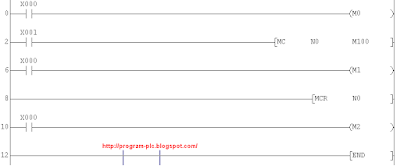
Simulation Make (MC) Master Control and (MCR) Master Control Reset for PLC Keyence


Example Ladder PLC Keyence Programming :
Example Ladder PLC Keyence

Simulation Make (MC) Master Control and (MCR) Master Control Reset for PLC Keyence :


Please Download : Simulation Make MC and MCR PLC Keyence

See : How to Work MC and MCR

How to Work (MC) Master control and (MCR) Master Control Reset for PLC Keyence Programming


MC / MCR - PLC Keyence Programming
How to Work (MC) Master control and (MCR) Master Control Reset With some Conditions :
Condition 1 :
Input X000 = ON , Input X001 = OFF and M100 = OFF, Output M0 = ON , Output M1 = OFF And , Output M2 = ON

MC MCR PLC Keyence Condition 1

Condition 2 :
Input X000 = ON , Input X001 = ON and M100 = ON, Output M0 = ON , Output M1 = ON And , Output M2 = ON

MC MCR PLC Keyence Condition 2

Definition Function (MC) Master control and (MCR) Master Control Reset PLC Mitsubishi Programming


MC PLC Mitsubishi :
MC - Master Control.
MC PLC for Mitsubishi

Purpose:
After the execution of an MC instruction, the bus line (LD, LDI point) shifts to a point after the MC instruction.

MCR PLC Mitsubishi :
MCR - Master Control Reset.
MCR PLC for Mitsubishi

Purpose:
An MCR instruction returns this to the original bus line.

MC and MCR at GX Developer Write Mode for PLC Mitsubishi :
MC MCR GX Developer Write Mode PLC Mitsubishi

MC and MCR at GX Developer Monitor Mode for PLC Mitsubishi :
MC MCR GX Developer Monitor Mode PLC Mitsubishi

See : Simulation Make MC and MCR

Simulation Make (MC) Master Control and (MCR) Master Control Reset for PLC Mitsubishi


Example Ladder PLC Mitsubishi Programming :
Example Ladder PLC Mitsubishi

Simulation Make (MC) Master Control and (MCR) Master Control Reset PLC Mitsubishi :


Please Download : Simulation Make MC and MCR PLC Mitsubishi

See : How to Work MC and MCR

How to Work (MC) Master control and (MCR) Master Control Reset for PLC Mitsubishi Programming


MC / MCR - PLC Mitsubishi Programming
How to Work (MC) Master control and (MCR) Master Control Reset With some Conditions :
Condition 1 :
Input X000 = ON , Input X001 = OFF and M100 = OFF, Output M0 = ON , Output M1 = OFF And , Output M2 = ON

MC MCR PLC Mitsubishi Condition 1

Condition 2 :
Input X000 = ON , Input X001 = ON and M100 = ON, Output M0 = ON , Output M1 = ON And , Output M2 = ON

MC MCR PLC Mitsubishi Condition 2

Definition Function (IL) Interlock and (ILC) Interlock Clear for PLC Omron Programming


IL PLC Omron :
IL(02) - Interlock.
IL PLC for Omron
Purpose:
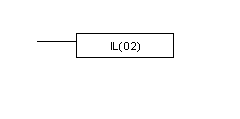
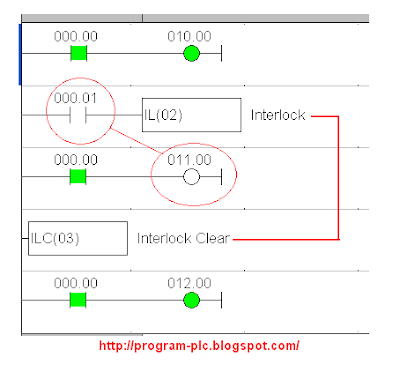
If an interlock condition is OFF, all outputs and all timer PVs between the current IL(02) and the next ILC(03) are turned OFF or reset, respectively. Other instructions are treated as NOP. Counter PVs are maintained. If the execution condition is ON, execution continues normally.

ILC PLC Omron :
ILC(03) - Interlock Clear.
ILC PLC for Omron
Purpose:
If an interlock condition is OFF, all outputs and all timer PVs between the current IL(02) and the next ILC(03) are turned OFF or reset, respectively. Other instructions are treated as NOP. Counter PVs are maintained. If the execution condition is ON, execution continues normally.

IL and ILC at Software SYSWIN for PLC Omron :

IL ILC SYSWIN PLC Omron

See : Simulation Make IL and ILC

Simulation Make (IL) Interlock and (ILC) Interlock Clear for PLC Omron


Example Ladder PLC Omron Programming :
Example IL ILC Ladder PLC Omron

Simulation Make (IL) Interlock and (ILC) Interlock Clear PLC Omron :


Please Download : Simulation Make IL and ILC PLC Omron

See : How to Work IL and ILC
Sponsored Links :

ALL ARTICLES
SUBSCRIBE BY EMAIL:

Delivered by FeedBurner


PLC Simulation Update

Popular Posts

Free Download PLC

Custom Search
Copyright © PLC Ladder