PLC for Injection Molding Machine


Simulation : Injection Molding Machine

Injection Molding Machine

Detail Injection Molding Machine :

Detail Injection Molding Machine
Information on Drawing Numbers :
1.Cylinder to Reverse - Forward for Molding Dies
2. Limit Switch Reverse for Molding Dies
3. Limit Switch Forward for Molding Dies
4. Molding Dies
5. Heater to Heat the Raw Materials
---(Heater is Controlled by Temperature Controller)
6. Speed Control Motor to Rotate the Screw
7. Screws to Inject material into the Molding Dies
8. Plastic Raw Material Seeds
9. Materials that are Liquid


Number Of Inputs and Output PLC applied :
1. Number Of Inputs PLC is 7 Input :
--- 1 Unit Input for Push Button Start.
--- 1 Unit Input for Push Button Stop.
--- 1 Unit Input for Temperature is Reached, the Signal from the Contact Contactor or Output the Temperature Controller.
--- 1 Unit Input for Alarm Heater, the Signal from the Heater Element Burnout Detector.
--- 1 Unit Input for Alarm Motor, the Signal from the Speed Control Motor.
--- 1 Unit Input for Limit Switch Reverse from Cylinder Molding.
--- 1 Unit Input for Limit Switch Forward from Cylinder Molding.
--- Total Number Of Inputs PLC is Minimum 7 Input Unit.

Remarks To Alarm Heater or Motor :
If ALARM or FAULT Then Output Alarm = OFF.
If NO ALARM Then Output Alarm = ON.

2. Number Of Output PLC is 4 Output :
--- 1 Unit Output for Speed Control Motor ( ON / OFF Motor for Screw ) .
--- 2 Unit Output for Solenoid to Pneumatic Cylinder Molding Reverse and Molding Forward.
--- 1 Unit Output for Heater ON / OFF to Temperature Controller.
--- Total Number Of Outputs PLC is Minimum 4 Output Unit.


Sequence PLC Programming for Injection Molding Machine :

Step 1 :
a. If Push Button Start = ON Then Heater = ON.
Please Click : Heater Controller with PLC
b. If Temperature is Reached And Alarm Heater = ON And Alarm Motor = ON ( See Remarks above) Then Injection Molding is Ready for use.


Step 2 :
a. If Push Button Start = ON And Injection Molding is Ready And Limit Switch Reverse from Cylinder Molding = ON Then Solenoid to Cylinder Molding Forward = ON.
b. If Solenoid to Cylinder Molding Forward = ON And Limit Switch Forward from Cylinder Molding = ON Then Motor for Screw = ON And Timer Motor ON Activated.
c. Data Set Value Timer Motor ON = 10 Second ( Data Setting = 10 second (Can be Changed) ) for Volume of Materials into Molding Dies.
d. If Timer Motor ON = ON Then Motor for Screw = OFF And Timer Wait Cool Activated (Wait for the Cool Material ) .
e. Data Set Value Timer Wait Cool = 15 Second ( Data Setting = 15 second (Can be Changed) ) for Wait for the Cool Material.
f. If Timer Motor Wait Cool = ON Then Solenoid to Cylinder Molding Reverse = ON.
g. If Solenoid to Cylinder Molding Reverse = ON And Limit Switch Reverse from Cylinder Molding = ON Then Solenoid to Cylinder Molding Forward = ON.
h. Continuous Process.
Download Simulation Process : PLC for Injection Molding Machine


Step 3 :
a. If Push Button Stop = ON Then Injection Molding Machine Stop ( All System OFF ).


Can You make Program Ladder PLC ?

If Can't :

PLC Omron Programming for Injection Molding Machine

PLC Mitsubishi Programming for Injection Molding Machine

PLC Keyence Programming for Injection Molding Machine

PLC Omron Programming for Injection Molding Machine


PLC Type Series-C Omron , Name Input / Output PLC :

INPUT PLC :
000.00 ; Push Button START
000.01 ; NO Contact Contactor for Temperature is Reached
000.02 ; Alarm Heater Element Bournout Detector
000.03 ; Push Button STOP
000.04 ; Alarm Motor, the Signal from the Speed Control Motor.
000.05 ; Limit Switch Reverse from Cylinder Molding
000.06 ; Limit Switch Forward from Cylinder Molding

OUTPUT PLC :
005.00 ; Power Temperature Controller
005.01 ; Speed Control Motor ( ON / OFF Motor for Screw )
005.02 ; Solenoid to Pneumatic Cylinder Molding Forward
005.03 ; Solenoid to Pneumatic Cylinder Molding Reverse


Please Download Picture Programming Ladder PLC :

PLC Omron Programming for Injection Molding Machine


Reading Ladder PLC Programming for Injection Molding Machine :

Step 1 : Heating Process
Heater Controller with PLC

Step 2 : Injection Molding Process
a.If 010.01 = ON And 010.04 = ON And 000.04 = ON Then 010.05 = ON.
b.If 000.00 = ON And 010.05 = ON And 000.03 = OFF Then 010.06 = ON ( Hold ON ).
c.If 000.05 = ON And 000.06 = OFF And 010.06 = ON And 010.11 = OFF Then 010.07 = ON ( Hold ON ).
d.If 000.06 = ON And 000.05 = OFF And 010.06 = ON And 010.10 = OFF Then 010.08 = ON ( Hold ON ) And TIM001 Activated .
e.If 010.08 = ON And TIM001 = ON And 010.06 = ON And 010.11 = OFF Then 010.09 = ON ( Hold ON ) And TIM002 Activated.
f.If TIM001 = ON Then SET 010.10 = ON ( Hold ON ).
g.If TIM002 = ON Then SET 010.11 = ON ( Hold ON ).
h.If 010.09 = ON And TIM002 = ON And 010.06 = ON And 010.10 = ON Or 010.11 = ON Then 010.12 = ON ( Hold ON ).
i.If 010.12 = ON And 000.05 = ON Or 010.06 = OFF Then RSET 010.10 = ON ( 010.10 = OFF ) And RSET 010.11 = ON ( 010.11 = OFF ).
See Picture to Set Value Timer for :
1. Stability Current from Power to Heater
2. Volume of Materials into Molding Dies
3. Wait for the cool Material
Set Value Timer Omron
Step 3 : Output PLC
a.If 010.01 = ON Then 005.00 = ON.
b.If 010.08 = ON Then 005.01 = ON.
c.If 010.07 = ON Then 005.02 = ON.
d.If 010.12 = ON Then 005.03 = ON.

Please Download Programming for SYSWIN :
PLC Omron Programming for Injection Molding Machine


See : PLC for Injection Molding Machine

PLC Mitsubishi Programming for Injection Molding Machine


PLC Type FX-Mitsubishi, Name Input / Output PLC :

INPUT PLC :
X000 ; Push Button START
X001 ; NO Contact Contactor for Temperature is Reached
X002 ; Alarm Heater Element Bournout Detector
X003 ; Push Button STOP
X004 ; Alarm Motor, the Signal from the Speed Control Motor.
X005 ; Limit Switch Reverse from Cylinder Molding
X006 ; Limit Switch Forward from Cylinder Molding

OUTPUT PLC :
Y000 ; Power Temperature Controller
Y001 ; Speed Control Motor ( ON / OFF Motor for Screw )
Y002 ; Solenoid to Pneumatic Cylinder Molding Forward
Y003 ; Solenoid to Pneumatic Cylinder Molding Reverse


Please Download Picture Programming Ladder PLC :

PLC Mitsubishi Programming for Injection Molding Machine


Reading Ladder PLC Programming for Injection Molding Machine :

Step 1 : Heating Process
Heater Controller with PLC

Step 2 : Injection Molding Process
a.If M1 = ON And M4 = ON And X004 = ON Then M5 = ON.
b.If X000 = ON And M5 = ON And X003 = OFF Then M6 = ON ( Hold ON ).
c.If X005 = ON And X006 = OFF And M6 = ON And M11 = OFF Then M7 = ON ( Hold ON ).
d.If X006 = ON And X005 = OFF And M6 = ON And M10 = OFF Then M8 = ON ( Hold ON ) And T1 Activated .
e.If M8 = ON And T001 = ON And M6 = ON And M11 = OFF Then M9 = ON ( Hold ON ) And T2 Activated.
f.If T1 = ON Then SET M10 = ON ( Hold ON ).
g.If T2 = ON Then SET M11 = ON ( Hold ON ).
h.If M9 = ON And T2 = ON And M6 = ON And M10 = ON Or M11 = ON Then M12 = ON ( Hold ON ).
i.If M12 = ON And X005 = ON Or M6 = OFF Then RST M10 = ON ( M10 = OFF ) And RST M11 = ON ( M11 = OFF ).
See Picture to Set Value Timer for :
1. Stability Current from Power to Heater
2. Volume of Materials into Molding Dies
3. Wait for the cool Material
Set Value Timer Mitsubishi
Step 3 : Output PLC
a.If M1 = ON Then Y000 = ON.
b.If M8 = ON Then Y001 = ON.
c.If M7 = ON Then Y002 = ON.
d.If M12 = ON Then Y003 = ON.

Please Download Programming for GX Developer :
PLC Mitsubishi Programming for Injection Molding Machine


See : PLC for Injection Molding Machine

PLC Keyence Programming for Injection Molding Machine


PLC Type KV Keyence , Name Input / Output PLC :

INPUT PLC :
0000 ; Push Button START
0001 ; NO Contact Contactor for Temperature is Reached
0002 ; Alarm Heater Element Bournout Detector
0003 ; Push Button STOP
0004 ; Alarm Motor, the Signal from the Speed Control Motor.
0005 ; Limit Switch Reverse from Cylinder Molding
0006 ; Limit Switch Forward from Cylinder Molding

OUTPUT PLC :
0500 ; Power Temperature Controller
0501 ; Speed Control Motor ( ON / OFF Motor for Screw )
0502 ; Solenoid to Pneumatic Cylinder Molding Forward
0503 ; Solenoid to Pneumatic Cylinder Molding Reverse


Please Download Picture Programming Ladder PLC :

PLC Keyence Programming for Injection Molding Machine


Reading Ladder PLC Programming for Injection Molding Machine :

Step 1 : Heating Process
Heater Controller with PLC


Step 2 : Injection Molding Process
a.If 1001 = ON And 1004 = ON And 0004 = ON Then 1005 = ON.
b.If 0000 = ON And 1005 = ON And 0003 = OFF Then 1006 = ON ( Hold ON ).
c.If 0005 = ON And 0006 = OFF And 1006 = ON And 1011 = OFF Then 1007 = ON ( Hold ON ).
d.If 0006 = ON And 0005 = OFF And 1006 = ON And 1010 = OFF Then 1008 = ON ( Hold ON ) And T001 Activated .
e.If 1008 = ON And T001 = ON And 1006 = ON And 1011 = OFF Then 1009 = ON ( Hold ON ) And T002 Activated.
f.If T001 = ON Then SET 1010 = ON ( Hold ON ).
g.If T002 = ON Then SET 1011 = ON ( Hold ON ).
h.If 1009 = ON And T002 = ON And 1006 = ON And 1010 = ON Or 1011 = ON Then 1012 = ON ( Hold ON ).
i.If 1012 = ON And 0005 = ON Or 1006 = OFF Then RES 1010 = ON ( 1010 = OFF ) And RES 1011 = ON ( 1011 = OFF ).
See Picture to Set Value Timer for :
1. Stability Current from Power to Heater
2. Volume of Materials into Molding Dies
3. Wait for the cool Material
Set Value Timer Keyence
Step 3 : Output PLC
a.If 1001 = ON Then 0500 = ON.
b.If 1008 = ON Then 0501 = ON.
c.If 1007 = ON Then 0502 = ON.
d.If 1012 = ON Then 0503 = ON.

Please Download Programming for KV Builder :
PLC Keyence Programming for Injection Molding Machine


See : PLC for Injection Molding Machine

PLC Omron Programming for Heater Controller


PLC Type Series-C Omron , Name Input / Output PLC :

INPUT PLC :
000.00 ; Swicth for Heater ON - OFF
000.01 ; NO Contact Contactor
000.02 ; Alarm Heater Element Bournout Detector

OUTPUT PLC :
005.00 ; Power Temperature Controller
005.01 ; Alarm Heater Lamp ( RED Lamp )
005.02 ; Temperature is Reached Lamp ( GREEN Lamp )


Please Download Picture Programming Ladder PLC :

PLC Omron Programming for Heater Controller


Reading Ladder PLC Programming for Heater Controller :
Step 1 :
a.If 000.00 = ON Then 010.00 = Momentary ON ( Diff. Up).
b.If 010.00 = ON And 000.00 = ON And 010.02 = OFF Then 010.01 = ON ( Hold ON ).

Step 2 : Check Alarm Heater
a.If 000.01 = ON And 010.01 = ON Then T000 Activated.
b.If TIM000 = ON And 000.02 = OFF Then SET 010.02 = ON ( Hold ON ).
c.If 000.00 = OFF Then RSET 010.02 = ON ( 010.02 = OFF ).
See Picture to Set Value Timer for Stability Current from Power to Heater :
Set Value Timer TIM000 omron
Step 3 : Temperature is Reached
a.If 000.01 = ON And 010.01 = ON And 000.00 = ON And 010.02 = OFF Then 010.03 = ON ( Hold ON ).
b.If 000.01 = OFF And 010.03 = ON Then SET 010.04 = ON ( Hold ON ).
c.If 010.01 = OFF And 000.00 = OFF And 010.02 = ON Then RSET 010.04 = ON ( 010.04 = OFF ).

Step 4 :
a.If 010.01 = ON Then 005.00 = ON.
b.If 010.02 = ON Then 005.01 = ON.
c.If 010.04 = ON Then 005.02 = ON.

Please Download Programming for SYSWIN :
PLC Omron Programming for Heater Controller


See : Heater controller with PLC

PLC Mitsubishi Programming for Heater Controller


PLC Type FX-Mitsubishi, Name Input / Output PLC :

INPUT PLC :
X000 ; Swicth for Heater ON - OFF
X001 ; NO Contact Contactor
X002 ; Alarm Heater Element Bournout Detector

OUTPUT PLC :
Y000 ; Power Temperature Controller
Y001 ; Alarm Heater Lamp ( RED Lamp )
Y002 ; Temperature is Reached Lamp ( GREEN Lamp )


Please Download Picture Programming Ladder PLC :

PLC Mitsubishi Programming for Heater Controller


Reading Ladder PLC Programming for Heater Controller :
Step 1 :
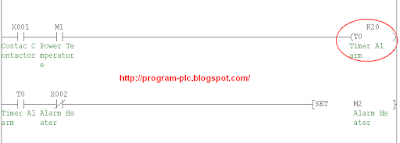
a.If X000 = ON Then M0 = Momentary ON ( Pulse ).
b.If M0 = ON And X000 = ON And M2 = OFF Then M1 = ON ( Hold ON ).

Step 2 : Check Alarm Heater
a.If X001 = ON And M1 = ON Then T0 Activated.
b.If T0 = ON And X002 = OFF Then SET M2 = ON ( Hold ON ).
c.If X000 = OFF Then RST M2 = ON ( M2 = OFF ).
See Picture to Set Value Timer for Stability Current from Power to Heater :
Set Value Timer T0 plc mitsubishi
Step 3 : Temperature is Reached
a.If X001 = ON And M1 = ON And X000 = ON And M2 = OFF Then M3 = ON ( Hold ON ).
b.If X001 = OFF And M3 = ON Then SET M4 = ON ( Hold ON ).
c.If M1 = OFF And X000 = OFF And M2 = ON Then RST M4 = ON ( M4 = OFF ).

Step 4 :
a.If M1 = ON Then Y000 = ON.
b.If M2 = ON Then Y001 = ON.
c.If M4 = ON Then Y002 = ON.

Please Download Programming for GX Developer :
PLC Mitsubishi Programming for Heater Controller


See : Heater controller with PLC

PLC Keyence Programming for Heater Controller


PLC Type KV Keyence , Name Input / Output PLC :

INPUT PLC :
0000 ; Swicth for Heater ON - OFF
0001 ; NO Contact Contactor
0002 ; Alarm Heater Element Bournout Detector

OUTPUT PLC :
0500 ; Power Temperature Controller
0501 ; Alarm Heater Lamp ( RED Lamp )
0502 ; Temperature is Reached Lamp ( GREEN Lamp )


Please Download Picture Programming Ladder PLC :

PLC Keyence Programming for Heater Controller


Reading Ladder PLC Programming for Heater Controller :
Step 1 :
a.If 0000 = ON Then 1000 = Momentary ON ( Diff. Up).
b.If 1000 = ON And 0000 = ON And 1002 = OFF Then 1001 = ON ( Hold ON ).

Step 2 : Check Alarm Heater
a.If 0001 = ON And 1001 = ON Then T000 Activated.
b.If T000 = ON And 0002 = OFF Then SET 1002 = ON ( Hold ON ).
c.If 0000 = OFF Then RES 1002 = ON ( 1002 = OFF ).
See Picture to Set Value Timer for Stability Current from Power to Heater :
Set Value Timer T000
Step 3 : Temperature is Reached
a.If 0001 = ON And 1001 = ON And 0000 = ON And 1002 = OFF Then 1003 = ON ( Hold ON ).
b.If 0001 = OFF And 1003 = ON Then SET 1004 = ON ( Hold ON ).
c.If 1001 = OFF And 0000 = OFF And 1002 = ON Then RES 1004 = ON ( 1004 = OFF ).

Step 4 :
a.If 1001 = ON Then 0500 = ON.
b.If 1002 = ON Then 0501 = ON.
c.If 1004 = ON Then 0502 = ON.

Please Download Programming for KV Builder :
PLC Keyence Programming for Heater Controller


See : Heater controller with PLC

Heater Controller with PLC


Diagram of Heating Process
Diagram of heating process

See : Wiring Heater

Number Of Inputs and Output PLC applied :
1. Number Of Inputs PLC is 3 Input :
--- 1 Unit Input for Swicth for Heater ON - OFF.
--- 1 Unit Input for Temperature is Reached from NO Contact Contactor.
--- 1 Unit Input for Alarm Heater from Alarm Heater Element Bournout Detector.
--- Total Number Of Inputs PLC is Minimum 3 Input Unit.

2. Number Of Output PLC is 3 Output :
--- 1 Unit Output for Heater ON / OFF to Power Temperature Controller .
--- 1 Unit Output for Alarm Heater Lamp ( RED Lamp ).
--- 1 Unit Output for Temperature is Reached Lamp ( GREEN Lamp ).
--- Total Number Of Outputs PLC is Minimum 3 Output Unit.


Sequence PLC Programming for Heater controller with PLC :

Step 1 : Check Alarm Heater
a. If Swicth for Heater = ON Then Power Temperature Controller = ON.
b. If NO Contact Contactor = ON And Power Temperature Controller = ON Then Timer Alarm Activated.
c. Data Set Value Timer Alarm = 2 Second ( Data Setting = 2 second (Can be Changed) ) for Stability Current from Power to Heater.
d. If Timer Alarm = ON And Alarm Heater = OFF ( NO Alarm is ON And Alarm is OFF ) Then Alarm Heater Lamp = ON And Power Temperature Controller = OFF ( Hold OFF Until Swicth for Heater = OFF ).
e. If Swicth for Heater = OFF Then Power Temperature Controller = OFF.
Step 2 : Temperature is Reached
a. If NO Contact Contactor = ON (Hold ON by Heating Pocess ) And Power Temperature Controller = ON And Swicth for Heater = ON And Alarm Heater Lamp = OFF Then Heating Pocess = ON.
c. If NO Contact Contactor = ON to OFF And Heating Pocess = ON Then Temperature is Reached Lamp = ON ( Hold ON ).
d. If Power Temperature Controller = OFF Or Swicth for Heater = OFF Or Alarm Heater Lamp = ON Then Temperature is Reached Lamp = OFF.


Can You make Program Ladder PLC ?

If Can't :

PLC Omron Programming for Heater Controller

PLC Mitsubishi Programming for Heater Controller

PLC Keyence Programming for Heater Controller

Wiring Heater to PLC


1. Example Heater :
CAST - IN HEATER ( ILF )
CAST - IN HEATER
2. Example Temperature Sensor :
A wide Variety of High-precision Temperature Sensor
Temperature Sensor
3. Example Digital Temperature Controller :
Basic-type Digital Temperature Controller
E5CN/E5CN-U ( OMRON )
Digital Temperature Controller E5CN/E5CN-U OMRON
4. Example Heater Element Burnout Detector :
K2CU-F Series ( OMRON )
Heater Element Burnout Detector K2CU-F Series OMRON
5. Example Contactor :
Detail Contactor
Wiring Heater, Temperature Sensor, Digital Temperature Controller, Heater Element Burnout Detector, Contactor to Input / Output PLC
Wiring Heater to Input / Output PLC

See : Heater Controller with PLC
Sponsored Links :

ALL ARTICLES
SUBSCRIBE BY EMAIL:

Delivered by FeedBurner


PLC Simulation Update

Popular Posts

Free Download PLC

Custom Search
Copyright © PLC Ladder