Industrial Automation for Assembly Line with PLC


See Simulation Assembly Line

Simulation Assembly Line

Detail Industrial Automation for Assembly Line

Industrial Automation for Assembly Line with PLC

Number Of Inputs and Output PLC applied :
1. Number Of Inputs PLC is 13 Input :
--- 5 Unit Input for Push Button Emg / Emergency.
--- 5 Unit Input for Push Button Finish.
--- 2 Unit Input for Sensor 1 and Sensor 2.
--- 1 Unit Input for sensor 3. It's Function to Count Revolution or Distance Between Operators.
--- Total Number Of Inputs PLC is Minimum 13 Input Unit.

--- Example Push Button : Devices Input PLC
--- Example Sensor 1 and Sensor 2 : Sensor / Proximity

2. Number Of Output PLC is 16 Output :
--- 1 Unit Output for Contactor. It's Functions to electrical Motor Conveyor ( ON / OFF Motor )
--- 5 Unit Output for Emg / Emergency Lamp or Tower / Sign Lamp Red
--- 5 Unit Output for Finish Lamp or Tower / Sign Lamp Yellow
--- 5 Unit Output for Proses Lamp or Tower / Sign Lamp Green
--- Total Number Of Outputs PLC is Minimum 16 Output Unit

--- Example Tower / Sign Lamp : Devices Output PLC

Sequence PLC Programming for Assembly Line :

Step 1 :
If Push Button Emg Operator 1 = OFF Or Push Button Emg Operator 2 = OFF Or Push Button Emg Operator 3 = OFF Or Push Button Emg Operator 4 = OFF Or Push Button Emg Operator 5 = OFF Then Contactor for Motor Conveyor = OFF And All System OFF.


Step 2 :
a. If Sensor 1 = ON And Sensor 2 = OFF And All Push Button Finish = ON Then Contactor for Motor Conveyor = ON.
b. If Count ( Sensor 3 = ON ) = 2 ( Data Setting for Distance Between Operators ) Then Contactor for Motor Conveyor = OFF.


Step 3 :
a. If Push Button Emg = OFF Then Tower / Sign Lamp Red = ON.
b. If Push Button Finish = ON And Push Button Emg = ON Then Tower / Sign Lamp Yellow = ON.
c. If Sensor 1 = ON And Push Button Emg = ON Then Tower / Sign Lamp Green Operator 1 = ON.
d. If Count ( Motor Conveyor = ON , Motor Conveyor = OFF ) > 1 And Motor Conveyor = OFF And Push Button Emg = ON And Sensor 2 = OFF Then Tower / Sign Lamp Green Operator 2 = ON.
e. If Count ( Motor Conveyor = ON , Motor Conveyor = OFF ) > 2 And Motor Conveyor = OFF And Push Button Emg = ON And Sensor 2 = OFF Then Tower / Sign Lamp Green Operator 3 = ON.
f. If Count ( Motor Conveyor = ON , Motor Conveyor = OFF ) > 3 And Motor Conveyor = OFF And Push Button Emg = ON And Sensor 2 = OFF Then Tower / Sign Lamp Green Operator 4 = ON.
g. If Sensor 2 = ON And Push Button Emg = ON Then Tower / Sign Lamp Green Operator 2, 3, 4, 5 = ON.


Can You make Program Ladder PLC ?

If Can't :

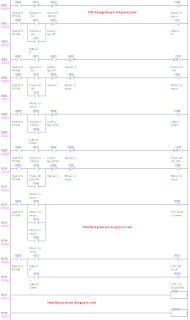
PLC Omron Programming Assembly Line

PLC Mitsubishi Programming Assembly Line

PLC Keyence Programming Assembly Line

Simulator Make PLC Holdings / Latching for PLC Programming


Simulator Make PLC Holdings / Latching for PLC Omron :

Please Download for Make PLC Holdings for PLC Omron :

Please Click : Make PLC Holdings for PLC Omron

Detail PLC Holdings / Latching for PLC Omron
Detail Make PLC Holdings for PLC Omron

Simulator Make PLC Holdings / Latchingfor PLC Mitsubishi :

Please Download for Make PLC Holdings for PLC Mitsubishi :

Please Click : Make PLC Holdings for PLC Mitsubishi

Detail PLC Holdings / Latchingfor PLC Mitsubishi
Detail Make PLC Holdings for PLC Mitsubishi

Simulator Make PLC Holdings / Latching for PLC Keyence :

Please Download for Make PLC Holdings for PLC Keyence :

Please Click : Make PLC Holdings for PLC Keyence

Detail PLC Holdings / Latching for PLC Keyence
Detail Make PLC Holdings for PLC Keyence

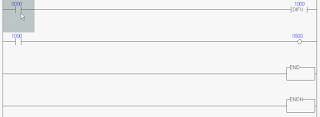
How to Work PLC Holdings / Latching With Scan PLC :
Scan 1 :
Input 0000 = OFF , Input 0001 = OFF And Output 1000 = OFF.

PLC Holdings scan plc 1

Scan 2 :
Input 0000 = ON , Input 0001 = OFF And Output 1000 = ON.

PLC Holdings scan plc 2

Scan 3 :
Input 0000 = OFF , Input 0001 = OFF And Output 1000 = ON.

PLC Holdings scan plc 3

Scan 4 :
Input 0000 = OFF , Input 0001 = ON And Output 1000 = OFF.

PLC Holdings scan plc 4

See Animation, How to Work PLC Holdings

Please Download for see Animation PLC Holdings :
Simulator PLC Holdings

Simulator Make Counter PLC


Simulator Make Counter PLC Omron :

Please Download for Simulator Make Counter PLC Omron :

Please Click : Simulator Make Counter PLC Omron

(Revision)
Detail Counter PLC Omron

Simulator Make Counter PLC Mitsubishi :

Please Download for Simulator Make Counter PLC Mitsubishi :

Please Click : Simulator Make Counter PLC Mitsubishi

Detail Counter PLC Mitsubishi

Simulator Make Counter PLC Keyence :

Please Download for Simulator Make Counter PLC Keyence :

Please Click : Simulator Make Counter PLC Keyence

Detail Counter PLC Keyence

See : Definition Function Counter for PLC Programming

Definition Function SET , RESET for PLC Programming


1. SET , RSET for PLC Omron :

SET - Set.
SET PLC Omron

Purpose:
Turns ON B for an ON execution condition; does not affect B for an OFF execution condition.

Ranges:

B: --- Bit --- IO, AR, HR, LR.

RSET - Reset.
RSET PLC Omron

Purpose:
Turns OFF B for an ON execution condition; does not affect B for an OFF execution condition.

Ranges:

B: --- Bit --- IO, AR, HR, LR.

2. SET , RST for PLC Mitsubishi :

SET - Set
SET PLC Mitsubishi

Purpose:
SET and RST instructions can be used for the same device as many times as necessary. However, the last instruction activated determines the current status.

RST - Reset
RST PLC Mitsubishi

Purpose:
SET and RST instructions can be used for the same device as many times as necessary. However, the last instruction activated determines the current status.

3. SET , RES for PLC Keyence :

SET - Set
SET PLC Keyence

Purpose:
Turns the device ON and holds it in this state.

RES - Reset
RES PLC Keyence

Purpose:
Turns the device OFF.

See : Simulator SET PLC or RESET PLC

Simulator SET , RESET for PLC Programming


How to Work SET , RESET With Scan PLC :
Scan 1 :
Input 0000 = OFF , Input 0001 = OFF , SET 1000 = OFF , RES 1000 = OFF , Input 1000 = OFF , And Output 0500 = OFF.

set reset scan plc 1

Scan 2 :
Input 0000 = ON , Input 0001 = OFF , SET 1000 = ON , RES 1000 = OFF , Input 1000 = ON , And Output 0500 = ON.

set reset scan plc 2

Scan 3 :
Input 0000 = OFF , Input 0001 = OFF , SET 1000 = ON , RES 1000 = OFF , Input 1000 = ON , And Output 0500 = ON.

set reset scan plc 3

Scan 4 :
Input 0000 = OFF , Input 0001 = ON , SET 1000 = OFF , RES 1000 = ON , Input 1000 = OFF , And Output 0500 = OFF.

set reset scan plc 4

Scan 5 :
Input 0000 = ON , Input 0001 = ON , SET 1000 = OFF , RES 1000 = ON , Input 1000 = OFF , And Output 0500 = OFF.

set reset scan plc 5

See Animation SET , RESET for PLC Programming

Please Download for see Animation SET , RESET :
Simulator SET , RESET

Definition Function DIFD, PLF, for PLC Programming


DIFD PLC Omron :
DIFD(14) - Differentiate Down.

DIFD PLC Omron

Purpose:
DIFD(14) turns ON the designated bit (B) for one scan on reception of the trailing (falling) edge of the input signal.

Ranges:

B: --- Bit --- IO, AR, HR, LR.

PLF PLC Mitsubishi :
PLF is Pulse Falling

PLF PLC Mitsubishi

Purpose:
When PLF instruction is executed, object devices Y and M operate for one operation cycle after the drive input signal has turned OFF.

DIFD PLC Keyence :
DIFD is Diff down or Differentiate down

DIFD PLC Keyence

Purpose:
Scans the target relay once (down differential) at the down edge of the previous state.

See : Simulator DIFD PLC or PLF PLC

Simulator DIFD PLC or PLF PLC


How to Work DIFD or PLF With Scan PLC :
Scan 1 :
Input 0000 = OFF , DIFD 1000 = OFF , Input 1000 = OFF , And Output 0500 = OFF

scan plc 1

Scan 2 :
Input 0000 = ON , DIFD 1000 = OFF , Input 1000 = OFF , And Output 0500 = OFF

scan plc 2

Scan 3 :
Input 0000 = OFF , DIFD 1000 = ON , Input 1000 = ON , And Output 0500 = ON

scan plc 3

Scan 4 :
Input 0000 = OFF , DIFD 1000 = OFF , Input 1000 = OFF , And Output 0500 = OFF

scan plc 4

See Animation DIFD PLC or PLF PLC

Please Download for see Animation DIFD PLC or PLF PLC :
Simulator DIFD PLC or PLF PLC

PLC Omron Programming for Assembly Line

PLC Type Series-C Omron , Name Input / Output PLC :
000.00 ; Push Button Emg Operator 1
000.01 ; Push Button Finish Operator 1
000.02 ; Push Button Emg Operator 2
000.03 ; Push Button Finish Operator 2
000.04 ; Push Button Emg Operator 3
000.05 ; Push Button Finish Operator 3
000.06 ; Push Button Emg Operator 4
000.07 ; Push Button Finish Operator 4
000.08 ; Push Button Emg Operator 5
000.09 ; Push Button Finish Operator 5
000.10 ; Sensor 1
000.11 ; Sensor 2
000.12 ; Sensor 3
005.00 ; Motor Conveyor
005.01 ; Emg Lamp Red Operator 1
005.02 ; Finish Lamp Yellow Operator 1
005.03 ; Proses Lamp Green Operator 1
005.04 ; Emg Lamp Red Operator 2
005.05 ; Finish Lamp Yellow Operator 2
005.06 ; Proses Lamp Green Operator 2
005.07 ; EmgLamp Red Operator 3
005.08 ; Finish Lamp Yellow Operator 3
005.09 ; Proses Lamp Green Operator 3
005.10 ; Emg Lamp Red Operator 4
005.11 ; Finish Lamp Yellow Operator 4
005.12 ; Proses Lamp Green Operator 4
005.13 ; Emg Lamp Red Operator 5
005.14 ; Finish Lamp Yellow Operator 5
005.15 ; Proses Lamp Green Operator 5


Please Download Image : PLC Omron Programming (Revision)


Please Download Programming for SYSWIN : PLC Omron Programming (Revision)


Reading PLC Programming for Assembly Line :
Step 1 :
If 000.00=ON And 000.02=ON And 000.04=ON And 000.06=ON And 000.08=ON Then 010.00=ON.
Step 2 :
a. If 010.00=ON And 000.01=ON Then Holding 010.01=ON ( SET ).
b. If 010.00=ON And 000.03=ON Then Holding 010.02=ON ( SET ).
c. If 010.00=ON And 000.05=ON Then Holding 010.03=ON ( SET ).
d. If 010.00=ON And 000.07=ON Then Holding 010.04=ON ( SET ).
e. If 010.00=ON And 000.09=ON Then Holding 010.05=ON ( SET ).
Step 3 :
a. If 010.00=OFF Or 010.07=ON Then Not Holding 010.01=OFF ( RSET ).
b. If 010.00=OFF Or 010.07=ON Then Not Holding 010.02=OFF ( RSET ).
c. If 010.00=OFF Or 010.07=ON Then Not Holding 010.03=OFF ( RSET ).
d. If 010.00=OFF Or 010.07=ON Then Not Holding 010.04=OFF ( RSET ).
e. If 010.00=OFF Or 010.07=ON Then Not Holding 010.05=OFF ( RSET ).
Step 4 :
If 010.01=ON And 010.02=ON And 010.03=ON And 010.04=ON And 010.05=ON Then 010.06=ON.
Step 5 :
a. If 010.00=ON And 000.10=ON And 000.11=OFF And 010.06=ON And C000=OFF Then 010.07=ON ( Latching ON ).
b. If C000=ON Then 010.07=OFF ( Latching OFF ).
Step 6 :
a. If 010.00=ON And 010.07=ON And 000.12=ON Then Differentiate Up 010.08=ON.
b. If 010.08=ON Then Count Up C000.
c. If Count C000>= 2 Then C000=ON.
d. If 010.00=OFF Or 010.07=OFF Then Reset C000 / Count C000=0.
Step 7 :
If 010.00=On And 010.07=ON Then Differentiate Down 010.09=ON.
Step 8 :
a. If 010.00=ON And 010.09=ON And 010.06=OFF Then 010.10=ON ( Latching ON ).
b. If 010.06=ON Then 010.10=OFF ( Latching OFF ).
Step 9 :
a. If 010.10=ON Then Count Up C001.
b. If 010.10=ON Then Count Up C002.
c. If 010.10=ON Then Count Up C003.
d. If Count C001>= 1 Then C001=ON.
e. If Count C002>= 2 Then C002=ON.
f. If Count C003>= 3 Then C003=ON.
g. If 010.00=OFF Then Reset C001 / Count C001=0, Reset C002 / Count C002=0, Reset C003 / Count C003=0.
Step 10 :
If 010.00=ON And 010.07=ON Then 005.00=ON.
Step 11 :
a. If 000.00=OFF Then 005.01=ON.
b. If 000.00=ON And 010.01=ON Then 005.02=ON.
c. If 000.00=ON And 000.10=ON And 010.01=OFF Then 005.03=ON.
Step 12 :
a. If 000.02=OFF Then 005.04=ON.
b. If 000.02=ON And 010.02=ON Then 005.05=ON.
c. If 000.02=ON And 010.10=ON And ( C001=ON Or 000.11=ON ) And 010.02=OFF Then 005.06=ON.
Step 13 :
a. If 000.04=OFF Then 005.07=ON.
b. If 000.04=ON And 010.03=ON Then 005.08=ON.
c. If 000.04=ON And 010.10=ON And ( C002=ON Or 000.11=ON ) And 010.03=OFF Then 005.09=ON.
Step 14 :
a. If 000.06=OFF Then 005.10=ON.
b. If 000.06=ON And 010.04=ON Then 005.11=ON.
c. If 000.06=ON And 010.10=ON And ( C003=ON Or 000.11=ON ) And 010.04=OFF Then 005.12=ON.
Step 15 :
a. If 000.08=OFF Then 005.13=ON.
b. If 000.08=ON And 010.05=ON Then 005.14=ON.
c. If 000.08=ON 000.11=ON And 010.05=OFF Then 005.15=ON.


See : PLC Holdings / Latching

See : Simulator Make Counter PLC

See : Definition Function SET , RESET for PLC

See : Definition Function DIFD, PLF, for PLC

See : Definition Function DIFU , PLS for PLC

See : Assembly Line

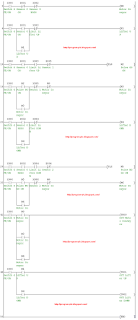
PLC Mitsubishi Programming for Assembly Line

PLC Type FX-Mitsubishi , Name Input / Output PLC :
X000 ; Push Button Emg Operator 1
X001 ; Push Button Finish Operator 1
X002 ; Push Button Emg Operator 2
X003 ; Push Button Finish Operator 2
X004 ; Push Button Emg Operator 3
X005 ; Push Button Finish Operator 3
X006 ; Push Button Emg Operator 4
X007 ; Push Button Finish Operator 4
X010 ; Push Button Emg Operator 5
X011 ; Push Button Finish Operator 5
X012 ; Sensor 1
X013 ; Sensor 2
X014 ; Sensor 3
Y000 ; Motor Conveyor
Y001 ; Emg Lamp Red Operator 1
Y002 ; Finish Lamp Yellow Operator 1
Y003 ; Proses Lamp Green Operator 1
Y004 ; Emg Lamp Red Operator 2
Y005 ; Finish Lamp Yellow Operator 2
Y006 ; Proses Lamp Green Operator 2
Y007 ; EmgLamp Red Operator 3
Y010 ; Finish Lamp Yellow Operator 3
Y011 ; Proses Lamp Green Operator 3
Y012 ; Emg Lamp Red Operator 4
Y013 ; Finish Lamp Yellow Operator 4
Y014 ; Proses Lamp Green Operator 4
Y015 ; Emg Lamp Red Operator 5
Y016 ; Finish Lamp Yellow Operator 5
Y017 ; Proses Lamp Green Operator 5


Please Download Image : PLC Mitsubishi Programming


Please Download Programming for GX Developer : PLC Mitsubishi Programming


Reading PLC Programming for Assembly Line :
Step 1 :
If X000=ON And X002=ON And X004=ON And X006=ON And X010=ON Then M0=ON.
Step 2 :
a. If M0=ON And X001=ON Then Holding M1=ON ( SET ).
b. If M0=ON And X003=ON Then Holding M2=ON ( SET ).
c. If M0=ON And X005=ON Then Holding M3=ON ( SET ).
d. If M0=ON And X007=ON Then Holding M4=ON ( SET ).
e. If M0=ON And X011=ON Then Holding M5=ON ( SET ).
Step 3 :
a. If M0=OFF Or M7=ON Then Not Holding M1=OFF ( RSET ).
b. If M0=OFF Or M7=ON Then Not Holding M2=OFF ( RSET ).
c. If M0=OFF Or M7=ON Then Not Holding M3=OFF ( RSET ).
d. If M0=OFF Or M7=ON Then Not Holding M4=OFF ( RSET ).
e. If M0=OFF Or M7=ON Then Not Holding M5=OFF ( RSET ).
Step 4 :
If M1=ON And M2=ON And M3=ON And M4=ON And M5=ON Then M6=ON.
Step 5 :
a. If M0=ON And X012=ON And X013=OFF And M6=ON And C0=OFF Then M7=ON ( Latching ON ).
b. If C0=ON Then M7=OFF ( Latching OFF ).
Step 6 :
a. If M0=ON And M7=ON And X014=ON Then Pulse M8=ON.
b. If M8=ON Then Count Up C0.
c. If Count C0>= 2 Then C0=ON.
d. If M0=OFF Or M7=OFF Then Reset C0 / Count C0=0.
Step 7 :
If M0=On And M7=ON Then Pulse Falling M9=ON.
Step 8 :
a. If M0=ON And M9=ON And M6=OFF Then M10=ON ( Latching ON ).
b. If M6=ON Then M10=OFF ( Latching OFF ).
Step 9 :
a. If M10=ON Then Count Up C1.
b. If M10=ON Then Count Up C2.
c. If M10=ON Then Count Up C3.
d. If Count C1>= 1 Then C1=ON.
e. If Count C2>= 2 Then C2=ON.
f. If Count C3>= 3 Then C3=ON.
g. If M0=OFF Then Reset C1 / Count C1=0, Reset C2 / Count C2=0, Reset C3 / Count C3=0.
Step 10 :
If M0=ON And M7=ON Then Y000=ON.
Step 11 :
a. If X000=OFF Then Y001=ON.
b. If X000=ON And M1=ON Then Y002=ON.
c. If X000=ON And X012=ON And M1=OFF Then Y003=ON.
Step 12 :
a. If X002=OFF Then Y004=ON.
b. If X002=ON And M2=ON Then Y005=ON.
c. If X002=ON And M10=ON And ( C1=ON Or X013=ON ) And M2=OFF Then Y006=ON.
Step 13 :
a. If X004=OFF Then Y007=ON.
b. IfX004=ON And M3=ON Then Y010=ON.
c. If X004=ON And M10=ON And ( C2=ON Or X013=ON ) And M3=OFF Then Y011=ON.
Step 14 :
a. If X006=OFF Then Y012=ON.
b. If X006=ON And M4=ON Then Y013=ON.
c. If X006=ON And M10=ON And ( C3=ON Or X013=ON ) And M4=OFF Then Y014=ON.
Step 15 :
a. If X010=OFF Then Y015=ON.
b. If X010=ON And M5=ON Then Y016=ON.
c. If X010=ON X013=ON And M5=OFF Then Y017=ON.


See : PLC Holdings / Latching

See : Simulator Make Counter PLC

See : Definition Function SET , RESET for PLC

See : Definition Function DIFD, PLF, for PLC

See : Definition Function DIFU , PLS for PLC

See : Assembly Line

PLC Keyence Programming for Assembly Line

PLC Type KV Keyence , Name Input / Output PLC :
0000 ; Push Button Emg Operator 1
0001 ; Push Button Finish Operator 1
0002 ; Push Button Emg Operator 2
0003 ; Push Button Finish Operator 2
0004 ; Push Button Emg Operator 3
0005 ; Push Button Finish Operator 3
0006 ; Push Button Emg Operator 4
0007 ; Push Button Finish Operator 4
0008 ; Push Button Emg Operator 5
0009 ; Push Button Finish Operator 5
0010 ; Sensor 1
0011 ; Sensor 2
0012 ; Sensor 3
0500 ; Motor Conveyor
0501 ; Emg Lamp Red Operator 1
0502 ; Finish Lamp Yellow Operator 1
0503 ; Proses Lamp Green Operator 1
0504 ; Emg Lamp Red Operator 2
0505 ; Finish Lamp Yellow Operator 2
0506 ; Proses Lamp Green Operator 2
0507 ; EmgLamp Red Operator 3
0508 ; Finish Lamp Yellow Operator 3
0509 ; Proses Lamp Green Operator 3
0510 ; Emg Lamp Red Operator 4
0511 ; Finish Lamp Yellow Operator 4
0512 ; Proses Lamp Green Operator 4
0513 ; Emg Lamp Red Operator 5
0514 ; Finish Lamp Yellow Operator 5
0515 ; Proses Lamp Green Operator 5


Please Download Image : PLC Keyence Programming


Please Download Programming for KV Builder : PLC Keyence Programming


Reading PLC Programming for Assembly Line :
Step 1 :
If 0000=ON And 0002=ON And 0004=ON And 0006=ON And 0008=ON Then 1000=ON.
Step 2 :
a. If 1000=ON And 0001=ON Then Holding 1001=ON ( SET ).
b. If 1000=ON And 0003=ON Then Holding 1002=ON ( SET ).
c. If 1000=ON And 0005=ON Then Holding 1003=ON ( SET ).
d. If 1000=ON And 0007=ON Then Holding 1004=ON ( SET ).
e. If 1000=ON And 0009=ON Then Holding 1005=ON ( SET ).
Step 3 :
a. If 1000=OFF Or 1007=ON Then Not Holding 1001=OFF ( RES ).
b. If 1000=OFF Or 1007=ON Then Not Holding 1002=OFF ( RES ).
c. If 1000=OFF Or 1007=ON Then Not Holding 1003=OFF ( RES ).
d. If 1000=OFF Or 1007=ON Then Not Holding 1004=OFF ( RES ).
e. If 1000=OFF Or 1007=ON Then Not Holding 1005=OFF ( RES ).
Step 4 :
If 1001=ON And 1002=ON And 1003=ON And 1004=ON And 1005=ON Then 1006=ON.
Step 5 :
a. If 1000=ON And 0010=ON And 0011=OFF And 1006=ON And C000=OFF Then 1007=ON ( Latching ON ).
b. If C000=ON Then 1007=OFF ( Latching OFF ).
Step 6 :
a. If 1000=ON And 1007=ON And 0012=ON Then Differentiate Up 1008=ON.
b. If 1008=ON Then Count Up C000.
c. If Count C000>= 2 Then C000=ON.
d. If 1000=OFF Or 1007=OFF Then Reset C000 / Count C000=0.
Step 7 :
If 1000=On And 1007=ON Then Differentiate Down 1009=ON.
Step 8 :
a. If 1000=ON And 1009=ON And 1006=OFF Then 1010=ON ( Latching ON ).
b. If 1006=ON Then 1010=OFF ( Latching OFF ).
Step 9 :
a. If 1010=ON Then Count Up C001.
b. If 1010=ON Then Count Up C002.
c. If 1010=ON Then Count Up C003.
d. If Count C001>= 1 Then C001=ON.
e. If Count C002>= 2 Then C002=ON.
f. If Count C003>= 3 Then C003=ON.
g. If 1000=OFF Then Reset C001 / Count C001=0, Reset C002 / Count C002=0, Reset C003 / Count C003=0.
Step 10 :
If 1000=ON And 1007=ON Then 0500=ON.
Step 11 :
a. If 0000=OFF Then 0501=ON.
b. If 0000=ON And 1001=ON Then 0502=ON.
c. If 0000=ON And 0010=ON And 1001=OFF Then 0503=ON.
Step 12 :
a. If 0002=OFF Then 0504=ON.
b. If 0002=ON And 1002=ON Then 0505=ON.
c. If 0002=ON And 1010=ON And ( C001=ON Or 0011=ON ) And 1002=OFF Then 0506=ON.
Step 13 :
a. If 0004=OFF Then 0507=ON.
b. If 0004=ON And 1003=ON Then 0508=ON.
c. If 0004=ON And 1010=ON And ( C002=ON Or 0011=ON ) And 1003=OFF Then 0509=ON.
Step 14 :
a. If 0006=OFF Then 0510=ON.
b. If 0006=ON And 1004=ON Then 0511=ON.
c. If 0006=ON And 1010=ON And ( C003=ON Or 0011=ON ) And 1004=OFF Then 0512=ON.
Step 15 :
a. If 0008=OFF Then 0513=ON.
b. If 0008=ON And 1005=ON Then 0514=ON.
c. If 0008=ON 0011=ON And 1005=OFF Then 0515=ON.


See : PLC Holdings / Latching

See : Simulator Make Counter PLC

See : Definition Function SET , RESET for PLC

See : Definition Function DIFD, PLF, for PLC

See : Definition Function DIFU , PLS for PLC

See : Assembly Line

PLC Programming for Sorter Machine


See Simulation Sorter Machine

Simulation Sorter Machine

Detail Sorter Machine

Sorter Machine

Number Of Inputs and Output PLC applied :
1. Number Of Inputs PLC is 7 Input :
--- 1 Unit Input for ON / OFF Selector Switch
--- 1 Unit Input for GO from Sensor 0
--- 1 Unit Input for NOGO from Sensor 0
--- 1 Unit Input for Limit Lifter UP
--- 1 Unit Input for Limit Lifter DOWN
--- 1 Unit Input for Work Sensor from Sensor 1
--- 1 Unit Input for Work Sensor from Sensor 2
--- Total Number Of Inputs PLC is Minimum 7 Input Unit

--- For Sensor 0 , 1 Unit sensor with 2 output ( 1 output for GO, 1 Output for NOGO )
--- Example Type Sensor 0 ( GO , NOGO ) : Thickness Detection Sensor

--- For Sensor 1 and Sensor 2 , 1 Unit Sensor with 1 Output.
--- Example Type Sensor 1 and 2 ( Goods Sensor ) : Goods Sensor or Proximity

2. Number Of Output PLC is 3 Output :
--- 1 Unit Output for Contactor. It's Functions to electrical Motor Conveyor ( ON / OFF Motor )
--- 1 Unit Output for Electrical Solenoid Type Center Closed. It's Functions to Moves Lifter DOWN
--- 1 Unit Output for Electrical Solenoid Type Center Closed. It's Functions to Moves Lifter UP
--- Total Number Of Outputs PLC is Minimum 3 Output Unit


Sequence PLC Programming for Sorter Machine :

Step 1 :
a. If Switch = ON And Sensor 0 (GO) = OFF And Sensor 0 (NOGO) = OFF Then Contactor for Motor Conveyor = ON.
b. If Switch = OFF or Sensor 0 (GO) = ON or Sensor 0 (NOGO) = ON Then Contactor for Motor Conveyor = OFF.

Step 2 :
a. If Switch = ON And Sensor 0 (GO) = ON and Limit Lifter UP = OFF Then Solenoid Lifter UP = ON.
b. If Switch = ON And Sensor 0 (GO) = ON and Limit Lifter UP = ON Then Solenoid Lifter UP = OFF.
c. If Switch = ON And Sensor 0 (NOGO) = ON and Limit Lifter DOWN = OFF Then Solenoid Lifter DOWN = ON.
d. If Switch = ON And Sensor 0 (NOGO) = ON and Limit Lifter DOWN = ON Then Solenoid Lifter DOWN = OFF.

Step 3 :
a. If Sensor 0 (GO) = ON And Limit Lifter UP = ON And Sensor 1 = OFF Then Contactor for Motor Conveyor = ON.
b. If Sensor 0 (NOGO) = ON And Limit Lifter DOWN = ON And Sensor 2 = OFF Then Contactor for Motor Conveyor = ON.

Can You make Program Ladder PLC ?

If Can't :

To : PLC Omron Programming Sorter Machine

To : PLC Mitsubishi Programming Sorter Machine

To : PLC Keyence Programming Sorter Machine


See : Industrial Automation for Assembly Line with PLC

Definition Function DIFU or PLS PLC Programming


DIFU PLC Omron :
DIFU(13) - Differentiate Up.
DIFU PLC Omron

Purpose:
DIFU(13) turns ON the designated bit (B) for one scan on reception of the leading (rising) edge of the input signal.

Ranges:

B: --- Bit --- IO, AR, HR, LR.

PLS PLC Mitsubishi :
PLS is Pulse
PLS PLC Mitsubishi

Purpose:
When PLS instruction is executed, object devices Y and M operate for one operation cycle after the drive input signal has turned ON.

DIFU PLC Keyence :
DIFU is Diff up or Differentiate Up
DIFU PLC Keyence

Purpose:
Scans the target relay once (up differential) at the up edge of the previous state.

See : Simulator DIFU PLC or PLS PLC

Simulator DIFU PLC or PLS PLC


See Animation DIFU PLC or PLS PLC

Please Download for see Animation DIFU PLC or PLS PLC :

Please Click : Simulator DIFU PLC or PLS PLC

How to Work DIFU or PLS With Scan PLC :
Scan 1 :
Input 0000 = OFF , DIFU 1000 = OFF , Input 1000 = OFF , And Output 0500 = OFF

DIFU or PLS With Scan PLC 1

Scan 2 :
Input 0000 = ON , DIFU 1000 = ON , Input 1000 = ON , And Output 0500 = ON

DIFU or PLS With Scan PLC 2

Scan 3 :
Input 0000 = ON , DIFU 1000 = OFF , Input 1000 = OFF , And Output 0500 = OFF

DIFU or PLS With Scan PLC 3

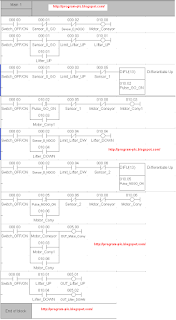
PLC Keyence Programming for Sorter Machine


PLC Keyence Programming for Sorter Machine

Reading PLC Programming for Sorter Machine :

Step 1 :
If 0000=ON And 0001=OFF And 0002=OFF Then 1000=ON.

Step 2 :
If 0000=ON And 0001= ON ( Latching ) And 0003= OFF Then 1001=ON ( Latching ON ).

Step 3 :
If 0000=ON And 0001=ON And 0003=ON And 0005=OFF Then Pulse UP 1002.

Step 4 :
If 0000=ON And Pulse UP 1002 ( Latching ) and 0005=OFF And 1000=OFF Then 1003=ON ( Latching ON ).

Step 5 :
If 0000=ON And 0002=ON ( Latching ) and 0004=OFF Then 1004=ON ( Latching ON ).

Step 6 :
If 0000=ON And 0002=ON and 0004=ON And 0006=OFF Then Pulse UP1005.

Step 7 :
If 0000=ON And Pulse UP 1005 ( Latching ) and 0006=OFF And 1000=OFF Then 1006=ON ( Latching ON ).

Step 8 :
If 0000=ON And 1000=ON or 1003=ON or 1006=ON Then 0500=ON.

Step 8 :
a. If 0000=ON And 1001=ON Then 0501= ON.
b. If 0000=ON And 1004=ON Then 0502= ON.

See : Definition Function DIFU or PLS PLC

See : Animation Sorter Machine

PLC Mitsubishi Programming for Sorter Machine


PLC  Mitsubishi Programming for Sorter Machine

Reading PLC Programming for Sorter Machine :

Step 1 :
If X000=ON And X001=OFF And X002=OFF Then M0=ON.

Step 2 :
If X000=ON And X001= ON ( Latching ) And X003= OFF Then M1=ON ( Latching ON ).

Step 3 :
If X000=ON And X001=ON And X003=ON And X005=OFF Then Pulse UP M2.

Step 4 :
If X000=ON And Pulse UP M2 ( Latching ) and X005=OFF And M0=OFF Then M3=ON ( Latching ON ).

Step 5 :
If X000=ON And X002=ON ( Latching ) and X004=OFF Then M4=ON ( Latching ON ).

Step 6 :
If X000=ON And X002=ON and X004=ON And X006=OFF Then Pulse UP M5.

Step 7 :
If X000=ON And Pulse UP M5 ( Latching ) and X006=OFF And M0=OFF Then M6=ON ( Latching ON ).

Step 8 :
If X000=ON And M0=ON or M3=ON or M6=ON Then Y000=ON.

Step 8 :
a. If X000=ON And M1=ON Then Y001= ON.
b. If X000=ON And M4=ON Then Y002= ON.

See : Definition Function DIFU or PLS PLC

See : Animation Sorter Machine

PLC Omron Programming for Sorter Machine


PLC Omron Programming for Sorter Machine

Reading PLC Programming for Sorter Machine :

Step 1 :
If 000.00=ON And 000.01=OFF And 000.02=OFF Then 010.00=ON.

Step 2 :
If 000.00=ON And 000.01= ON ( Latching ) And 000.03= OFF Then 010.01=ON ( Latching ON ).

Step 3 :
If 000.00=ON And 000.01=ON And 000.03=ON And 000.05=OFF Then Pulse UP 010.02.

Step 4 :
If 000.00=ON And Pulse UP 010.02 ( Latching ) and 000.05=OFF And 010.00=OFF Then 010.03=ON ( Latching ON ).

Step 5 :
If 000.00=ON And 000.02=ON ( Latching ) and 000.04=OFF Then 010.04=ON ( Latching ON ).

Step 6 :
If 000.00=ON And 000.02=ON and 000.04=ON And 000.06=OFF Then Pulse UP 010.05.

Step 7 :
If 000.00=ON And Pulse UP 010.05 ( Latching ) and 000.06=OFF And 010.00=OFF Then 010.06=ON ( Latching ON ).

Step 8 :
If 000.00=ON And 010.00=ON or 010.03=ON or 010.06=ON Then 005.00=ON.

Step 8 :
a. If 000.00=ON And 010.01=ON Then 005.01= ON.
b. If 000.00=ON And 010.04=ON Then 005.02= ON.

See : Definition Function DIFU or PLS PLC

See : Animation Sorter Machine

Thickness Detection Sensor


Example Type Thickness Detection Sensor for Detection Goods ( GO , NOGO )
Thickness Detection Sensor

Specifications Thickness Detection Sensor with 2 output = GO , NOGO
Specifications Thickness Detection Sensor

To : PLC Programming for Sorter Machine

Goods Sensor or Proximity


Example Type Goods Sensor or Proximity to Detect there are not of Object
Goods Sensor

To : PLC Programming for Sorter Machine

PLC Programming for Packing Machine


See Simulation Packing Machine

Simulation Packing Machine

Detail Packing Machine

PLC Simulator Packing Machine

Number Of Inputs and Output PLC applied :
1. Number Of Inputs PLC is 7 Input :
--- 1 Unit Input for Limit Feeder Reverse
--- 1 Unit Input for Limit Feeder Forward
--- 1 Unit Input for Limit Lifter Lower
--- 1 Unit Input for Limit Lifter Middle
--- 1 Unit Input for Limit Lifter Upper
--- 1 Unit Input for Switch Start. It's Functions to Start Process
--- 1 Unit Input for Push Button RESET. It's Functions to ORIGIN Proses
--- Total Number Of Inputs PLC is Minimum 7 Input Unit


2. Number Of Output PLC is 4 Output :
--- 1 Unit Output for Electrical Solenoid. It's Functions to Moves Feeder Forward
--- 1 Unit Output for Electrical Solenoid. It's Functions to Moves Feeder Reverse
--- 1 Unit Output for Electrical Solenoid Type Center Closed. It's Functions to Moves Lifter DOWN
--- 1 Unit Output for Electrical Solenoid Type Center Closed. It's Functions to Moves Lifter UP
--- Total Number Of Outputs PLC is Minimum 4 Output Unit


Sequence PLC Programming for Packing Machine :

Step 1 : ( Feeder Forward to 1 )
If Feeder REV Limit = ON And Lifter UP Limit = ON And Switch Start = ON Then Cylindrical Feeder Forward = ON.

Step 2 :
1. If Cylindrical Feeder Forward = ON And Feeder FWD Limit = ON Then Cylindrical Feeder Reverse = ON.
2.a. If Cylindrical Feeder Forward = ON And Feeder FWD Limit = ON Then Cylindrical Lifter DOWN = ON.
2.b. If Lifter MID Limit = ON Then Cylindrical Lifter DOWN = OFF.

Step 3 : ( Feeder Forward to 2 )
If Feeder REV Limit = ON And Lifter MID Limit = ON Then Cylindrical Feeder Forward = ON.

Step 4 :
1. If Cylindrical Feeder Forward = ON And Feeder FWD Limit = ON Then Cylindrical Feeder Reverse = ON.
2.a. If Cylindrical Feeder Forward = ON And Feeder FWD Limit = ON Then Cylindrical Lifter DOWN = ON.
2.b. If Lifter LOW Limit = ON Then Cylindrical Lifter DOWN = OFF.

Step 5 : ( Feeder Forward to 3 )
If Feeder REV Limit = ON And Lifter MID Limit = ON Then Cylindrical Feeder Forward = ON.

Step 6 :
1. If Cylindrical Feeder Forward = ON And Feeder FWD Limit = ON Then Cylindrical Feeder Reverse = ON.
2.a. If Cylindrical Feeder Forward = ON And Feeder FWD Limit = ON Then Cylindrical Lifter UP = ON.
2.b. If Lifter UP Limit = ON Then Cylindrical Lifter UP = OFF.

Can You make Program Ladder PLC ?

If Can't :

To : PLC Programming

To : PLC Omron Programming for Packing Machine

To : PLC Mitsubishi Programming for Packing Machine

To : PLC Keyence Programming for Packing Machine

Makes Ladder PLC at Software PLC

Makes Ladder PLC at Software PLC Omron :
See Animation Makes Ladder PLC Omron

Makes Ladder PLC at Software PLC Omron

Please Download for see Animation Makes Ladder PLC Omron :

Please Click : Ladder PLC Omron

Makes Ladder PLC at Software PLC Mitsubishi :
See Animation Makes Ladder PLC Mitsubishi

Makes Ladder PLC at Software PLC Mitsubishi

Please Download for see Animation Makes Ladder PLC Mitsubishi :

Please Click : Ladder PLC Mitsubishi

Makes Ladder PLC at Software PLC Keyence :
See Animation Makes Ladder PLC Keyence

Makes Ladder PLC at Software PLC Keyence

Please Download for see Animation Makes Ladder PLC Keyence : Ladder PLC Keyence
Sponsored Links :

ALL ARTICLES
SUBSCRIBE BY EMAIL:

Delivered by FeedBurner


PLC Simulation Update

Popular Posts

Free Download PLC

Custom Search
Copyright © PLC Ladder