Video about the results of the PLC and Computer
(Laptop) communication
Architecture of PLC and Computer Communication:


Architecture of PLC and Computer Communication:

Remarks of PLC and Computer Communication Architecture:
PLC:
1. Siemens S7-200 PLC with PPI Communication Port
PLC Cable:
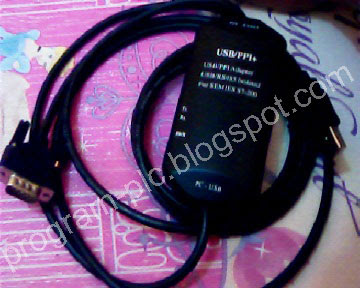
2. PLC Cable: USB to PPI (RS485)
Adapter for Siemens S7-200
Computer:
3. Computer or Laptop
4. Windows 7 Operating System, I use Windows 7 64Bit
5. PLC Cable Driver for Windows 7
6. Visual Basic 2010 Express
A. Prepared of Hardware and software for PLC and
Computer Communication
1. Siemens S7-200, CPU 226 CN

2. USB to PPI Adapter for Siemens S7-200

3. Download PLC Cable driver for windows 7, Click: CP210x_VCP_Win_XP_S2K3_Vista_7
4. Installation Siemens S7-200 PLC, PLC Cable and
Laptop

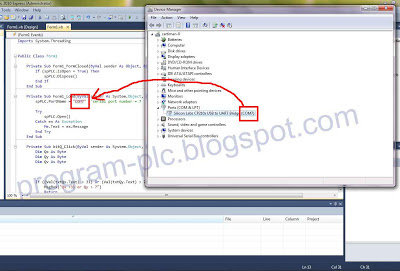
5. How to Serial Port Number Check in Windows 7

Video About How to Serial Port Number Check
B. Visual Basic Express Programming for PLC and
Computer Communication
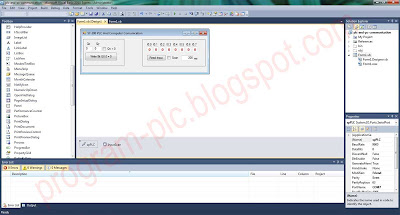
1. Layout Form in Visual Basic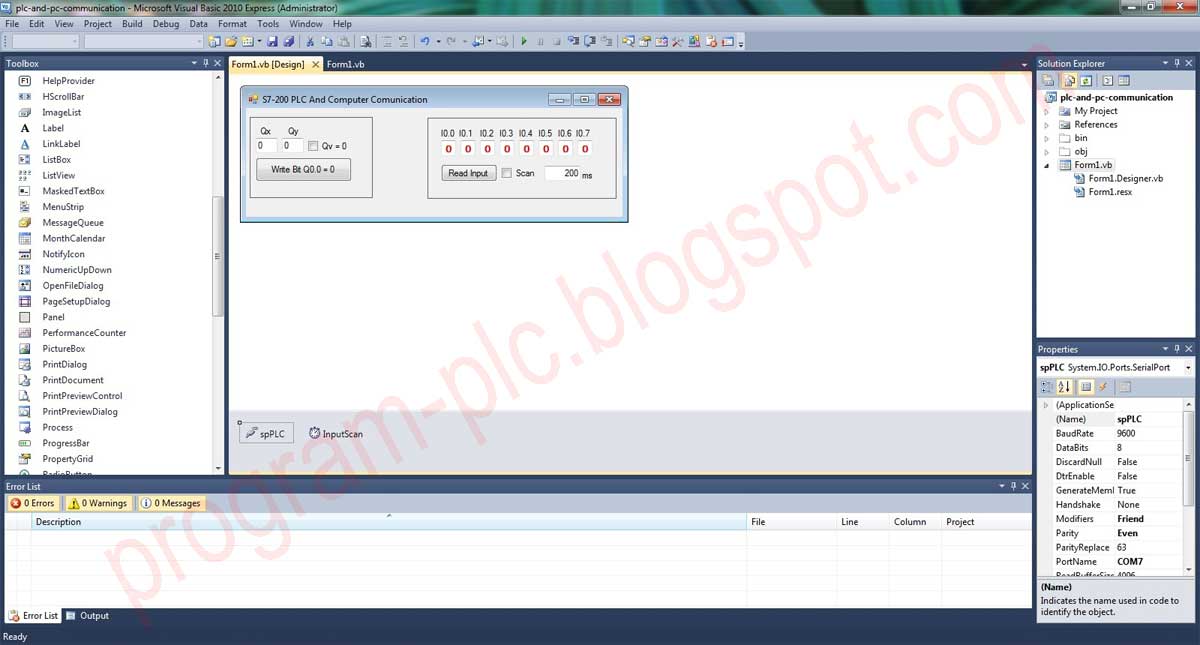
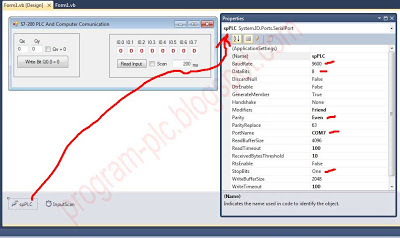
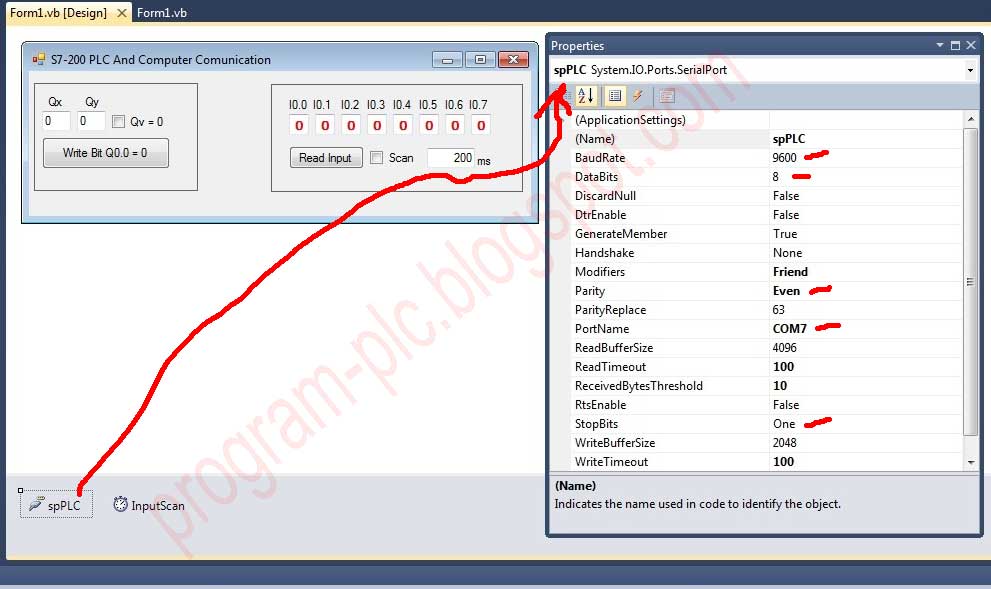
2. Communication setting in SerialPort Properties
3. Visual Basic Code
Imports System.Threading
Public Class Form1
Private Sub
Form1_FormClosed(ByVal sender As Object, ByVal e As
System.Windows.Forms.FormClosedEventArgs) Handles Me.FormClosed
If (spPLC.IsOpen = True)
Then
spPLC.Dispose()
End If
End Sub
Private Sub
Form1_Load(ByVal sender As System.Object, ByVal e As System.EventArgs) Handles
MyBase.Load
spPLC.PortName = "COM7" 'serial port number
= 7
Try
spPLC.Open()
Catch ex As Exception
Me.Text = ex.Message
End Try
End Sub
Private Sub
bitQ_Click(ByVal sender As System.Object, ByVal e As System.EventArgs) Handles
bitQ.Click
Dim Qx As Byte
Dim Qy As Byte
Dim Qv As Byte
If ((Val(txtQx.Text) > 31) Or (Val(txtQy.Text) > 7)) Then
MsgBox("Qx >31 or Qy > 7")
Return
End If
Qx = CByte(Val(txtQx.Text)) '
Qx.y
Qy = CByte(Val(txtQy.Text)) '
Qx.y
If (ckQv.Checked = True)
Then
Qv = 1 ' Q Value
Else
Qv = 0 ' Q Value
End If
Dim str_write(0 To
37) As Byte
Dim Temp_FCS As VariantType
Dim i As Long
bitQ.Enabled = False
str_write(0) = &H68
str_write(1) = &H20
str_write(2) = &H20
str_write(3) = &H68
str_write(4) = &H2
str_write(5) = &H0
str_write(6) = &H7C
str_write(7) = &H32
str_write(8) = &H1
str_write(9) = &H0
str_write(10) = &H0
str_write(11) = &H43
str_write(12) = &H1
str_write(13) = &H0
str_write(14) = &HE
str_write(15) = &H0
str_write(16) = &H5
str_write(17)
= &H5
str_write(18) = &H1
str_write(19) = &H12
str_write(20) = &HA
str_write(21) = &H10
str_write(22) = &H1 'len = 1
str_write(23) = &H0
str_write(24) = &H1
str_write(25) = &H0
str_write(26) = &H0 ' type q
str_write(27) = &H82 'type q
str_write(28) = &H0
str_write(29) = &H0
str_write(30) = Qx * 8 + Qy
str_write(31) = &H0
str_write(32) = &H3
str_write(33) = &H0
str_write(34) = &H1
str_write(35) = Qv
For i = 4 To 35
Temp_FCS = Temp_FCS + str_write(i)
Next
str_write(36) = Temp_FCS Mod 256
str_write(37) = &H16
If (spPLC.IsOpen = True)
Then
' Send the binary
data out the port
spPLC.Write(str_write, 0, str_write.Length)
Thread.Sleep(100) 'wait
100ms
End_comm() 'end Communication
End If
bitQ.Enabled = True
End Sub
Private Sub
End_comm()
'End Communication
Dim str_val(0 To 5) As Byte
spPLC.ReadExisting()
str_val(0) = &H10
str_val(1) = &H2
str_val(2) = &H0
str_val(3) = &H5C
str_val(4) = &H5E
str_val(5) = &H16
If (spPLC.IsOpen = True)
Then
spPLC.Write(str_val, 0, str_val.Length)
End If
End Sub
Private Sub
ckQv_CheckedChanged(ByVal sender As System.Object, ByVal e As System.EventArgs) Handles
ckQv.CheckedChanged
If (ckQv.Checked = True)
Then
ckQv.Text = "Qv = 1"
bitQ.Text = "Write Bit Q" +
txtQx.Text + "." + txtQy.Text + " = 1"
Else
ckQv.Text = "Qv = 0"
bitQ.Text = "Write Bit Q" +
txtQx.Text + "." + txtQy.Text + " = 0"
End If
End Sub
Private Sub
txtQx_TextChanged(ByVal sender As System.Object, ByVal e As System.EventArgs) Handles
txtQx.TextChanged
If (ckQv.Checked = True)
Then
ckQv.Text = "Qv = 1"
bitQ.Text = "Write Bit Q" +
txtQx.Text + "." + txtQy.Text + " = 1"
Else
ckQv.Text = "Qv = 0"
bitQ.Text = "Write Bit Q" +
txtQx.Text + "." + txtQy.Text + " = 0"
End If
End Sub
Private Sub
txtQy_TextChanged(ByVal sender As System.Object, ByVal e As System.EventArgs) Handles
txtQy.TextChanged
If (ckQv.Checked = True)
Then
ckQv.Text = "Qv = 1"
bitQ.Text = "Write Bit Q" +
txtQx.Text + "." + txtQy.Text + " = 1"
Else
ckQv.Text = "Qv = 0"
bitQ.Text = "Write Bit Q" +
txtQx.Text + "." + txtQy.Text + " = 0"
End If
End Sub
Private Sub
Ixy_Click(ByVal sender As
System.Object, ByVal
e As System.EventArgs)
Handles Ixy.Click
Dim str_read(0 To 32)
As Byte
Dim i As Integer
Dim Temp_FCS As VariantType
Dim Rx As String
Rx =
0 ' Read from I0.0
str_read(0) = &H68
str_read(1) = &H1B
str_read(2) = &H1B
str_read(3) = &H68
str_read(4) = &H2
str_read(5) = &H0
str_read(6) = &H6C
str_read(7) = &H32
str_read(8) = &H1
str_read(9) = &H0
str_read(10) = &H0
str_read(11) = &H0
str_read(12) = &H0
str_read(13) = &H0
str_read(14) = &HE
str_read(15) = &H0
str_read(16) = &H0
str_read(17) = &H4
str_read(18) = &H1
str_read(19) = &H12
str_read(20) = &HA
str_read(21) = &H10
str_read(22) = &H8 'read len 1=bit, 8=byte
str_read(23) = &H0
str_read(24) = &H1
str_read(25) = &H0
str_read(26) = &H0 ' type Ixy
str_read(27) = &H81 'type
Ixy=&H81, Qxy=&H82
str_read(28) = &H0
str_read(29) = (Str(Rx) * 8) \ 256
str_read(30) = (Str(Rx) * 8) Mod 256
For i = 4 To 30
Temp_FCS = Temp_FCS + str_read(i)
Next i
str_read(31) = Temp_FCS Mod 256
str_read(32) = &H16
If (spPLC.IsOpen = True)
Then
' Send the binary data out the port
spPLC.Write(str_read, 0, str_read.Length)
Thread.Sleep(100) 'wait
100ms
End_comm() 'end communication
End If
End Sub
Private DisplayDelegate As
New DisplayData(AddressOf Display)
Private Sub
spPLC_DataReceived(ByVal sender As System.Object, ByVal e As
System.IO.Ports.SerialDataReceivedEventArgs)
Handles spPLC.DataReceived
'Suppose that you want to use the built-in SerialPort
control (System.IO.Ports.SerialPort)
'this code is equivalent to the EnhancedSerialPort
DataReceived code
Dim BytesAvailable As
Integer = spPLC.BytesToRead
If BytesAvailable >= 29 Then
'Total byte data from I = 29
Dim
Buffer(0 To BytesAvailable - 1) As Byte
spPLC.Read(Buffer, 0, BytesAvailable)
Me.BeginInvoke(DisplayDelegate, Buffer)
End If
End Sub
Public Delegate Sub DisplayData(ByVal Buffer() As Byte)
'This delegate routine marshals receive data from the
receive thread context DataReceived to the Windows Form STAThread context
Private Sub Display(ByVal Buffer() As Byte)
Dim xyval As Byte
xyval
= Buffer(25)
txtI00.Text = (xyval And 1) / 1
txtI01.Text = (xyval And 2) / 2
txtI02.Text = (xyval And 4) / 4
txtI03.Text = (xyval And 8) / 8
txtI04.Text = (xyval And 16) / 16
txtI05.Text = (xyval And 32) / 32
txtI06.Text = (xyval And 64) / 64
txtI07.Text = (xyval And 128) / 128
End Sub
Private Sub
InputScan_Tick(ByVal sender As System.Object, ByVal e As System.EventArgs) Handles
InputScan.Tick
Ixy_Click(New Object(),
New EventArgs())
End Sub
Private Sub
scan_CheckedChanged(ByVal sender As System.Object, ByVal e As System.EventArgs) Handles
scan.CheckedChanged
If (Val(TimeScan.Text) < 200) Then TimeScan.Text = 200
InputScan.Interval = Val(TimeScan.Text)
If (scan.Checked = True)
Then
InputScan.Enabled = True
Ixy.Enabled = False
Else
InputScan.Enabled = False
Ixy.Enabled = True
End If
End Sub
End Class
4. Download Visual basic Code
3. Project File
Video about How to use Download File: PLC and Computer
Communication