CX Sever Lite is ActiveX Control for Omron PLC


CX-Server Lite contains an ActiveX communication control to interface to CX-Server Runtime providing Windows PC based applications communication to Omron PLCs and temperature controllers. The ActiveX control can be used within a Microsoft compliant ActiveX container making it especially easy when deployed within Excel or Visual Basic. In addition ActiveX control also includes a set of graphical Omron ActiveX controls, making it not only easy for exchange of data but creation of custom HMI applications.

The key features of CX-Server Lite are as following:
• ActiveX communication control for Omron PLCs. It is easily connect Windows based application to Omron hardware. No custom code to write or debug.
• Create HMI applications using Microsoft Excel and Visual Basic.
• Set of Omron ActiveX graphical controls. Turn Microsoft Excel into a PC-based HMI and saves time in Visual Basic.
• Script command set. For more advanced users, ActiveX communication control can be accessed through Visual Basic Script. Powerful command are available for such things as sending and receiving FINS messages to/from Omron PLCs as well as reading and writing arrays of data.
• Drag and drop toolbar.
• Proven and realize connections to Omron hardware.
• Reuse I/O point database with other CX-Automation Suite products. CX-Automation Suite products allows direct importing of CX-Programmer CDM file to CX-Server Lite project saving valuable engineering development time.

Hardware Requirement & Workflow Sequence of eM-PLC


eM-PLC and Siemens STEP 7 Professional run on Microsoft Windows 2000 and XP and should be installed on the same computer. Minimum PC configuration: Pentium III 766 MHz with 512MB RAM.

eM-PLC workflow sequence
Data preparation:
• Step 1: import the relevant CAD data into the modeling environment.
• Step 2: add the relevant kinematics behavior and additional model resources by taking advantage of the strong library handling.
• Step 3: Define the functional sequences (sequence of operations) using drag and drop in a Gantt Chart this data preparation can be done either in eM-workplace or by using the modeling functionality of eM-Engineer.

Automatic PLC code generation and programming
• Step 4: take advantage of the automatic signal generation and automatic creation of the sequential function chart (SFC).
• Step 5: add all the needed control definitions such as transitions, supervisions, alternatives, integration of library function blocks, definition of call hierarchy, etc.
• Step 6: let the system automatically, and quickly, create an entire STEP 7 project.

Virtual commissioning
• Step 7: run the program on a virtual PLC (STEP 7 PLCSIM) and verify it using the virtual cell. Check for the correctness of the control logic, evaluate emergency scenarios and optimize behavior.
• Step 8: test your program using a real PLC and optional real HMI (Human Machine Interface) against a virtual cell using OPC.

CX Server OPC for Omron PLC


HMI and SCADA applications communicate with control networks using drivers designed to different vendor specifications. In the past this meant that each HMI vendor had to create multitude of drivers and driver interfaces to their products. This created a product development and support nightmare.

The OPC standard was created to solve this problem. Now, an HMI vendor can create a single OPC client interface for their software. This OPC client can interface to any OPC server on the market. Vendors, such as Omron, have created reliable OPC server that support their networks. So, when an OPC client is connected to the OPC server, the HMI package freely exchanges data.

The key features are as following:
• Omron OPC server providing third-party OPC client HMI/SCADA applications connectivity to Omron PLCs, Omron other PLCs and networks.
• Bridge between multiple vendor OPC servers using OPC client ActiveX control.
• OPC Client ActiveX controls turns Microsoft Excel and Visual Basic into OPC Client application.
• Set of Omron ActiveX graphical controls.
• Works with third party ActiveX controls.
• Script command set.
• Drag and drop toolbar.

There are 3 CX-Server OPC components:
1. Omron OPC Server
CX-Server OPC provides an Omron OPC Server for customers needing to exchange data between Omron PLC and Temperature controllers and OPC Client applications, typically HMI/SCADA packages.

2. OPC Client ActiveX Control
CX-Server OPC also includes an OPC Client ActiveX control for Microsoft Excel and Visual Basic. Using the ActiveX control customers can create their own OPC Client HMI/SCADA from Excel or Visual Basic without having to write any of the underlying code for the OPC data exchange between OPC Server and OPC client.

3. Graphical ActiveX Controls
Graphical ActiveX controls provide pushbuttons, data displays, and a data logging viewer. They can be used in Excel or Visual Basic. An Excel spreadsheet can be made into a “front end” to PLCs, saving development time in Visual Basic providing pre-built controls.

eM-PLC : PLC Program Generation Like Experienced Control Engineer


eM-PLC fulfils all the basic and advanced requirements for PLC program generation much like a very experienced control engineer:

• It automatically defines all used variables (tags) in the symbol table, according to IEC 61131-3 addressing, while respecting user-predefines and protected input/output/memory areas. • It translates the functional sequence of operations into a sequential flow chart. The splitting of such sequences into independent cub-sequencers and automatic synchronizing is a built-in functionality that allows for the integration of maintenance considerations as well.
• It supports ladder logic, function block diagram, instruction list and SCL (structures control language).
• It fully integrates user-defined function block libraries, and enables automatic assignment of variables to library elements.
• Using “black box” logic block elements, equipment without mechanical motions or without 3D representation may be integrated.
• The option to make manual changes in STEP 7 Professional and to recognize and use them in and together with eM-PLC is widely supported.
• Tested and approved programs may be easily integrated into existing PLC programs.
• Advanced variant handling allows for the effective re-use of resources to support various working modes.

By generating the PLC program in the design phase, and then using eM-PLC/STEP 7 Professional to simulate the production cell in a virtual 3D environment, the production cell can be validated and analyzed in the design phase. As a next step, an OPC connection lets the PLC program run on the real target PLC and check the simulation one step closer to the shop floor. This also helps provide a full user environment that includes the real HMI (human machine interface) to control the production cell. This process, called virtual commissioning, eliminates problem that might otherwise be discovered later on the shop floor.

CX-Programmer Software to Program an Omron PLC


Omron is continuing to expand its growing family of software products for programming, communications, and data collection to interface with Programmable Logic Controllers (PLC). CX-Automation Suite is Omron’s family of software products that maximize productivity, simplifying to use Omron industrial automation products.
• Suite products use Omron’s CX-Server for powerful and reliable communications.
• Support all Omron communication protocols.
• All programs have common look and feel.
• Develop a single I/O point (tag) database for your PLC program using CX-Programmer and import it directly to CX-Supervisor or other CX-Automation Suite products.

At the core of Omron’s CX-Automation Suite is CX server Runtime, a common framework that all suite products use and share. A solid piece of middleware built on a Windows 32-bit platform, CX-Server runtime.

CX Server Runtime makes setting up communication easy, using a window explorer style smart configuration. Choose controller types, communication network and assign I/O points, and the configuration takes care of the rest. I/O points can also be imported / exported using Microsoft Excel. An entire network of Omron controllers can be configured for communications and data exchange in no time at all.

CX Server Runtime includes all the Omron communication protocols, Toolbus, HostLink (SYSMAC Way), SYSMAC Net, SYSMAC Link, Controller Link, Ethernet, and can act as gateway to FINS.

Generate Optimized PLC Programs with eM-PLC


With time and cost considerations putting pressure on new product introduction (NPI), PLC programming can no longer be seen as an isolated, independent function of moving a product forward onto the shop floor. By integrating eM-PLC, from UGS, and STEP 7 professional, from Siemens, you can optimize your engineering process and help cut ramp-up time significantly.

eM-PLC and STEP7 professional allows engineers from both mechanical design and control department to work in parallel and share information. The software enables the automatic generation of PLC programs directly from the virtual manufacturing cell and allows for “virtual commissioning” prior to building the equipment on the shop floor.

The seamless path from process design a to shop floor automation. eM-PLC enables to generate optimized PLC programs to the shop floor. As parts of the suite of eMPower solutions for Manufacturing Process Management (MPM), it allows engineers to design manufacturing cells, digital special machines and processes in a 3D virtual environment. The systems automatically generate a PLC code, which can be simulated and verified before it is downloaded to the PLC on the shop floor. By moving the testing and commissioning process from the shop floor onto the control engineer’s desktop, eM-PLC accelerates the planning and engineering process, the commissioning phase and production ramp-up.

CX Simulator Software to Test Program Omron PLC


CX-Simulator is a powerful software tool that functions as a virtual CJ1/CS1 PLC. It is the ultimate tool for CX Programmer developers to efficiently design, test, and debug program logic as well as serial and network connections. The program runs on a Windows based PC.

Use CX-Simulator prior to project start up when physical connections to the hardware are not available. Developed programs can be run and edited. I/O can be simulated to conform to field devices, network communications can be tested and program scan rates can be calculated. Existing programs can also be evaluated, providing the most efficient means of improving system performance.

Leverage all the debugging features of CX Programming and more Download ladder programs to CX- Simulator’s virtual CJ1/CS1 just as you would an actual Omron CJ1 or CS1 CPU and work “online” with CX-Programmer editing and testing.

Create I/O expressions or a debugging ladder logic program to simulate virtual external inputs. It is even possible to input an actual PLC “Data trace” or collect “Time Chart Monitor” data from CX-Programmer for input simulation.

The key features of CX-Simulator as following:
• Transfer logic programs using CX-Programmer just as with actual CJ1 or CS1 PLC connected.
• Simulate input conditions.
• Single step logic programs.
• Set break points.
• Filter for I/O conditions.
• Test/debug serial devices with “Live” connections through serial port.
• Send/receive FINS commands.
• Test/debug HMI/SCADA applications.
• Easy connection to CX-Programmer from toolbar menu.

A Systematic Approach of Control System Design Using A PLC


The concept of controlling system is a very simple and easy task. It involves a systematic approach by following the operation procedure.
1. Determine the Machine sequence of operation
You have to decide what equipment or system you want to control. The ultimate purpose of the programmable controller is to control an external system. This system to be controlled can be machine equipment, or process and is often generically called the controlled system.

2. Assignment of inputs and outputs
All external input and output devices to be connected to the programmable controllers must be determined. The input devices are the various switches, senses etc. the output devices are the solenoids, electromagnetic valves, motor, inductors etc.

3. Writing of the program
Write the Ladder Diagram program by following the control system sequence of operation as determined by step one.

4. Programming into memory
You can apply power to the programmable controller. Depending on the type of programmable controller, you may have to do an I/O generation to prepare the system configuration. After that, you can enter your program in the memory either by programming console or by computer aided ladder software tool. After completion of the programming, you should check for any coding errors by means of diagnostic function, and if possible simulate the whole operation to see that it is alright.

5. Running the system
Before the start push button is pressed, thoroughly ensure that the input and output wiring are correctly connected according to the I/O assignment. Once confirmed, the actual operation of the PLC can now be started. You may need to debug along the way and fine tune the control system if necessary. Test run thoroughly until it is safe to operate by anyone.

Interrupt Functions of CPM2A Programmable Logic Controllers


The CPM2A provides the following kinds of interrupt processing.

Interrupt Inputs
Interrupt programs are executed when inputs to the CPU unit’s built-in input points (00003 to 00006) are turned from OFF to ON. Interrupt subroutine numbers 000 to 003 allocated to input pins 00003 to 00006.

Interval Timer Interrupts
Interval timer interrupt programs are executed with the precision of 0.1 ms. Interrupt subroutine numbers 000 to 049 are allocated by instructions.

Count-up Interrupts Using the High-Speed Counter
Input signals to the CPU unit’s built-in input points (00003 to 00006) are counted at high speed (2 KHz), and the normal program is stopped and an interrupt program is executed. Interrupt subroutine numbers 000 to 003 are allocated to input points 00003 to 00006.

Count-check Interrupt Using the High-Speed Counter
Pulse input to the CPU unit built-in input points (00003 to 00006) are counted at high speed (20 KHz/5 KHz), and an interrupt program is executed when the present values matches the target value or falls within a given range. Interrupt subroutine numbers 000 to 049 are allocated by instructions.

The order of priority for interrupts is as follows:
priority for interrupts Functions of CPM2A
If an interrupt with a higher priority is generated. During interrupt program execution, the interrupt that is currently being processed will be stopped and the new interrupt will be processed first. Then the original interrupt will resumed after the higher priority interrupt processing has been completed.

If interrupt of the same priority are generated simultaneously, they will be processed in the following order: Interrupt inputs --> Interrupt input 1 --> Interrupt input 2 --> Interrupt input 3 --> (including count-up mode) Interval timer interrupt --> High-Speed counter interrupt.

PLC Power Interruption of CPM1A PLC


Supply Voltage Drop
When the supply voltage falls below 85% of the rated value, the PLC stops and the output goes OFF.

Momentary Power Failure Detection
A momentary power failure lasting less than 10 ms with an AC power supply and 2 ms with a DC power supply is not detected and the CPU continues to operate. A momentary power failure lasting longer than 10 ms with an AC power supply and 2 ms with a DC power supply may or may not be detected in an uncertain area.

When momentary power failure is detected, the CPU stops operating and the output go OFF.

Automatic Restart
When the supply voltage recovers to a value higher than 85% of the rated value, operation resumes automatically.

The PLC may repeat stop/start operations if the supply voltage of less than 85% of the rated value gradually goes up or down. If this affects the equipment, etc, provide a protection circuit which shut off the output if the supply voltage is not above the rated value.

Time Up to Start of Operation
The time from when the power supply is turned on to when the operation starts varies depending on the operation conditions such as power supply voltage, configuration, ambient temperature etc. the minimum time is approximately 300 ms.

Input Filtering of MicroLogix 1200 & 1500 PLC


The MicroLogix 1200 and 1500 controllers allow users to configure groups of DC inputs for high speed or normal operation. Users can configure each input group’s response time. A configurable filter determines how long the input signal must be ‘on’ or ‘off’ before the controller recognize the signal. The higher value, the longer it takes for the input state to be recognized by the controller. Higher values provide more filtering, and are used in electrically noisy environments. Lower values provide less filtering, and are used to detect fast or narrow pulses. You typically set the filters to a lower value when using high speed counters, latching inputs, and input interrupts.

Input filtering is configured using RSLogix 500 programming software. To configure the filters using RS Logix 500:
1. Open the ‘Controller’ folder.
2. Open the ‘I/O Configuration’ folder.
3. Open slot 0 (Controller).
4. Select the ‘Embedded I/O Configuration’ tab.

The input groups are pre-arranged. Simply select the filter time you require for each input group. You can apply a unique input filter setting to each of the input groups:
MicroLogix 1200 & 1500
The minimum and maximum response times associated with each input filter setting can be found in controller manual that attached on it.

MicroLogix 1200 PLC 1762-IR4 RTD Resistance Module Input Data File


For each module, slot x, words 0 through 3 contain the analog values of the inputs. Word 4 and 5 provide sensor or channel status feedback. The input data file for each configuration is shown below.
MicroLogix 1200 Module Input
The bits are defined as below:
• Sx = General status bits for inputs channel 0 through 3. This bit is set (1) when an error (over or under range, open circuit or input data not valid condition) exist for that channel, or there is a general module hardware error. An input data not valid condition is determined by the user program.

• OCx = Open circuit indication for channel 0 through 3, using either RTD or resistance inputs. Short circuit detection for RTD inputs only. Short circuit detection for resistance inputs is not indicated because 0 is valid number.

• Ox = Over-range flag bits for input channel 0 through 3, using either RTD or resistance inputs. These bits can be used in the control program for error detection.

• Ux = Under-range flag bits for channel 0 through 3, using RTD inputs only. These bits can be used in control program for error detection. Under-range detection for direct resistance inputs is not indicated because 0 is valid number.

MicroLogix 1200 PLC Expansion I/O


The MicroLogix 1200 provides discrete I/O that is built into the controller as listed in the following table. These I/O points are referred to as embedded I/O.
MicroLogix 1200 PLC Expansion I/O
AC embedded inputs have fixed input filters. DC embedded inputs have configurable inputs filters for a number of special functions that can be used in your application. These are high speed counting, event interrupts, and latching inputs.

If the application requires more I/O than the controller provides, you can attach I/O modules. These additional modules are called expansion I/O.

Expansion I/O Modules
MicroLogix 1200 expansion I/O is used to provide discrete and analog inputs and outputs, and specialty modules. For the MicroLogix 1200, you can attach up to six additional I/O modules. The number of 1762 I/O modules that can be attached to the MicroLogix 1200 is dependent on the amount of power required by the I/O modules.

Addressing Expansion I/O Slots
The configure below shows the addressing for the MicroLogix 1200 and it’s I/O. the expansion I/O is addressed as slot 1 through 6. Modules are counted from left to right as shown below:
Addressing Expansion I/O Slots
In most cases, you can use the following address format: X:s/b (X: File type letter, s: Slot number, b: bit number).

Bridging Network Using HMS Anybus X-Gateway


Using the existing Ethernet communications port available on the GE Fanuc family of PLC’s and the HMS Anybus X-Gateway, it is possible to create a transparent bridge between the PLC and any commonly used industrial network via Modbus/TCP.

The Anybus X-Gateway family is product line aimed to connect almost every possible combination of two industrial networks. The product family supports 17 different fieldbus networks such as PROFIBUS, DeviceNet, CANopen and CC Link allowing the GE Fanuc PLC family easy data transfer via Modbus/TCP. The X-Gateways are designed for use in industrial automation plants where increasingly many different networks are used. The X-Gateways help system integrator to easily interconnect any GE Fanuc PLC, enabling consistent information flow throughout the entire plant.

The X-Gateways primarily focus on the transfer of cyclic I/O data between two networks. This can either be a slave-slave combination or a master-slave combination. During the set up of the gateways, the users simply select the amount of I/O to be transferred between the GE Fanuc PLC and the foreign network. Since all industrial networks support a different amount of I/O data, the network with the least amount of I/O data determines how much data can be transferred in each case.

Programming Fail-Safe I/O ET 200S/ET 200M


ET 200S/ET 200M with F modules include fail-safe input and output modules as well as fail-safe motor starters.
• Fail-safe input modules detect information from sensors.
• Fail-safe output modules control actuators.
• Fail-safe motor starters control and monitor drives.

All F modules can diagnose internal and external errors and are configured with internal redundancy. They have dedicated self-test functions and meet relevant safety requirements. They are marked with a yellow labeling bar and can be removed during operation while connected to the power supply.

The software package ‘Distributed Safety’ does not require new training, since the safety-related programs for the fail-safe CPUs are programmed with the STEP7 languages LAD and FBD. A safety-oriented program is generated by means of a special input during compilation.

The following fail-safe ET200S modules are available:
• 4/8 F-DI 24 VDC, fail-safe digital input with 4 inputs, 2 channel, SIL 3 sensors or 8 inputs, 1-channel.
• 4 F-DO 24 VDC /2A, fail-safe digital output with 4 outputs for 24 V and 2A.
• PM-EF 24VDC, power module with 2 outputs for 24V/2A and an additional relay output, which is available on terminals and also provides the load power supply for subsequent modules.
• Motor starter fail-safe with accessories.

The following fail-safe modules are available for the ET 200M:
• Digital input 24 x 24 VDC
• Digital output 10 x 24 VDC/2A
• Analog input 6 x 4-20 mA/13bits

System Configuration SIMATIC S7-300F and Fail-Safe I/O


S7-300F with fall safe CPUs, the fail safe CPUs are based on standard CPU, whose operating system has been expanded with various protection functions in order to enable safety-oriented user programs to be executed.

Non-safety oriented programs can be processed without restrictions. Generic drivers enable to direct connection of third party field devices to PROFIBUS. The S7-300F can be expanded with fail-safe SM modules (F-DI and F-DO) of the ET 200M in centralized configurations and with fail-safe I/O of the ET 200S and ET 200M in distributed configurations. In distributed expansions, fail-safe communications are handled via PROFIBUS with PROFI safe profile.

Data communication between connected field devices takes place exclusively using one field bus the PROFIBUS DP. The PROFIsafe profile enables both safety-related and standard data to be transmitted via field bus.

Data is encapsulated in accordance with the PROFIsafe profile, so that it can be transmitted via the standard field bus without being corrupted by any other standard devices on the bus.

The S7-300F offers the same diagnostic and messaging functions as a standard SIMATIC PLC. None of the devices are subject to diagnostic restrictions. The S7-300F with fail-safe ET 200M or ET 200S PROFsafe I/O modules meets the following requirements:
• IEC/EN 61508 (up to SIL3)
• EN 954 (up to cat. 4)
• NFPA 79, NFPA 85

The Advantage of SIMATIC S7-300 and Fail Safe I/O


The importance of safety technology is increasingly steadily. The market demands safety-oriented solutions in order to make sure that people, machines, and the environments are protected.

The new solution denoted Distributed Safety comprises the fail-safe controller S7-300F and the Distributed I/O system SIMATIC ET200S, in addition to fail-safe signal modules. The modular design of the F peripherals requires you to employ safety technology only where it is indispensable.

It is also possible to connect the fail-safe signal modules of the ET200M to the S7-300F-either centrally distributed. This new concept provides the following advantages:
• Freely programmable safe linking of sensors with actuators.
• Selective safe shutdown of actuators.
• Mixed configuration of fail safe and standard modules in one station.
• 1-bus concept, transmission of fail-safe signals and standard signals through a bus medium (PROFIBUS DP).

This new solutions offer both mechanical engineers (OEMs, system constructors) and system operators (end customers) significant benefits in comparison to conventional solutions.

Siemens safety technology is part of standard automation-while maintaining continuity over the entire system, in applications where standard automation (traditional PLCs) and safety automation (electromechanics) are still separate. Distributed safety can combine these two worlds seamlessly to create an integrated complete system. Siemens is all-in-one provider for automation systems and integrates safety technology in standard automation components.

MicroLogix 1100 LCD Functionality


Through the embedded LCD, your MicroLogix 1100 lets you monitor bit and integer data within the controller, and optionally modify that data, to interact with your control program. Similarly to the optional 1764-DAT for the MicroLogix 1500 controllers, the embedded Micrologix 1100LCD allows users access to 48bits and 48 integers, each of which can be individually protected. Need to know the speed of conveyor, the status of a remote sensor, or how close your process is running relative to its optimal temperature? Just monitor your LCD.

Need to manually start an operation, change a timing sequence, or make adjustment to a counter? Why use your laptop and programming software when the LCD allows you to simulate pushbuttons or numeric entries devices? By simply moving or copying data in and out of the bit and integer files, you now can monitor and modify the parameters that your controller uses.
MicroLogix 1100 LCD
Making use of the new MicroLogix 1100 “LCD instruction”, your controller can directly interface with a local operator using your Ladder logic. The LCD instruction executes under 2 modes of operation, the first mode being ladder logic output to display only. In this mode, up to 3 lines data, with up to 12 characters per line. This line can consist of combinations of bits, integer and String characters.
MicroLogix 1100 LCD 2
The second mode, the operation allows for output from the ladder logic to the display, but adds input from the operator back to the controller. Up to 2 lines of up to 12 characters each can still be sent to LCD for display, but the third line in this mode is used to obtain numeric input from the user.
MicroLogix 1100 LCD 3

Networks of Vulnerabilities of SCADA Systems


Vulnerabilities in control system networks depend on the type of system. Legacy implementations rely on proprietary protocol and low bandwidth data channels. Accounting and logging are usually non-existent, making it impossible to find the basis and reason for vulnerabilities. Configuration passwords are often simple and may be limited in effectiveness by the device itself.

Little or no network restriction is implemented within the perimeter of network, allowing ‘telnet hopping’ from innocuous network devices to sensitive utility equipment. Two other factors contribute significantly to the vulnerability of control systems:

1. The blind trust in the capability of PCS links to faithfully transmit data. The geographically sparse PCS network generally forces links of considerable span. These are need filled by either cabled or wireless connections, which may be exclusively used by the PCS or shared. Shared links are more economically sensible, but many times PCS system at either end of the links is not adequately shielded from other entities using it. Furthermore, unsecured information on wireless and shared links is susceptible to eavesdropping or manipulation, and even long or unprotected unshared cable links may be vulnerable to a significant degree.

2. The connections between the PCS and external networks. An external network is any network that is not part of the PCS. Examples include interfaces to an administrative network or connections to other PCS systems for information transfer or mutual control. Often, interfaces to external systems assume that the outside network can be trusted, which leaves PCS security dependent on one or more organizations. This includes backdoor network access for strategic partners or IT consultants who are not secure by adequate firewall measures command logging or privilege control.

Design and Implementation Protocols of SCADA Systems


In SCADA systems, the three major categories of protocols involve the specifications for design and manufacture of sensors and actuators, specifications for RTUs, and the specifications for communications between components of a control system.

These can be segregated into three levels for a functional representation as shown in picture below:
SCADA Systems
SCADA system hardware components are designed for industrial environments, and offer robust features for operation in austere environments. Understanding how a SCADA system is designed requires understanding the environment it operates in, both for operations functions and management functions. Some question that should be answered includes:
• What environment factors will affect the process, either negatively or positively?
• What environment factors will affect the system components either negatively or positively?
• What is an acceptable level of interference by environmental factors?
• How should these factors be mitigated?

A complex system will likely have many interfaces, each of which may become an avenue of attack. All interfaces must be closely examined and evaluated in order to understand how it must be protected, both system wide and at the individual components.
Some questions that should be answered include:
• What interfaces exist for data to flow out of the system?
• What interfaces exist for instructions to flow into the system?
• What level of access is required to the feedback data returned by the process?
• Etc.

Security Concerns in SCADA Systems


SCADA systems are not designed with security in mind. Rather the priority of developers has been reliability, availability and speed. This does not mean they can not be secured, however, if we can understand a particular system’s features, functions and capabilities, we can address its limitations.

No inherent security is provided in these systems, since security is not a direct concern when the efficiency of the system is under consideration.

This situation is acceptable as long as the systems are isolated from the outside world. However in recent times, more and more of these systems are being exposed to open access, in order to promote inter-system communication and interaction. Two recent trends raising concerns are:

a. Definition of standard interfaces and communication protocols in support of cross-vendor compatibility and modularity.

b. Connection of nodes in a SCADA system to open networks such as the internet. While these phenomena have definitely brought about an increase in the efficiency of these information systems, they have also caused them to inherit all the problem of common, networked information systems. The security of information, both against corruption and misuse, is now an increasing concern for theses systems. This concern for security becomes even more magnified when these systems are deployed in key positions, where they are heavily depended upon for critical operations.

Intelligent Remote I/O with SNAP I/O in Allen Bradley PLC System


What would be the advantage of expanding your ControlLogic or CompactLogix PLC system with intelligent remote I/O? The distributed intelligent would only reduce the additional load on the PLC but also accommodate new functional requirements and special applications, allowing the system to grow while still under the same PLC’s overall control. In essence, you could enrich tour Allen Bradley system by expanding its size and functional capabilities, and still be standardized on Logix PLC systems.

For example be standardized on Microsoft software and Dell computers but chooses printers or other peripherals from other vendors for specific purposes, you can continuous to use Allen Bradley software, PLCs, and training and maintenance contracts while choosing another vendor for specific I/O needs. Supplementing your PLC system with intelligent remote I/O gives you options that may work well for your application.

Opto 22, industrially hardened I/O, offers an intelligent remote I/O system called SNAP I/O that fully supports Ethernet IP, the protocol used by Logix PLCs. It is good because this remote I/O still can be used in Allen Bradley PLCs system.

Because SNAP I/O supports Ethernet IP natively, engineers currently using Allen Bradley PLCs can supplement their control networks and expand capabilities without concerns about communications and compatibility, without extra programming and with little effect on PLC performance.
standardized on Allen Bradley PLCs system

Fuzzy Controller and its Applications


Fuzzy logic is human concept, potentially applicable to a wide range of processes and tasks that require human intuition and experience. In computer, truth values are either 1 or 0, which correspond to true/false duality. In Fuzzy logic, truth is the matter of degree, thus truth-values range between 1 and 0 in a continuous manner. Fuzzy logic is a method for representing information in a way that resembles natural human communication. It is rule based system. Fuzzy logic control can be applied by means of software, dedicated controllers, or Fuzzy microprocessor embedded in digital products. Application flexibility combined with inherent simplicity and a wide range of capabilities give Fuzzy logic technology a great potential growth.

Fuzzy systems are rule based with a strong mathematical basis. A Fuzzy system is basically made of a fuzzifier, a defuzzifier, an inference engine and a rule base. The role of fuzzifier is to map the crisp input data value to fuzzy sets defined by their membership function depending on the degree of “possibility” of the input data. The goal of defuzzifier is to map the output fuzzy sets to a crisp output value. It combines the different fuzzy sets with different degrees of possibility to produce a single numerical value.

Fuzzy interference engine defines how system should infer through rules in the rule base to determine the output fuzzy sets. Fuzzy technology has already contributed to some industrial control applications. Future sensors applications for fuzzy logic might include flow and proximity sensors. Additional control applications for fuzzy logic will be in the chemical processing industries.

Powerful Interlock System with PLC


Conventional interlock systems rely heavily on hard wired electromagnetic relays. If larger systems have to be implemented in relay logic, the complexity limit is soon reached; the systems become too bulky, and wiring expenses sky-rocket; moreover, the intelligent of those designs is limited such a way to be left out. Relay interlocks are inherent inflexible, if the configuration of the system they protect has to change, a disproportional amount of time, work and money has to be invested in order to adapt the hard wiring of the interlock system to the new requirement.

More powerful interlock systems can be built by using computer based approaches. In this realm, Programmable Logic Controllers (PLCs) represent the most cost efficient approach. The interlock logic is no longer hard wired, but coded in software. The PLC approach offers several advantages:
• Flexible system configuration due to modular hardware and software.
• Regularly scheduled background tests of PLC system and sensitive I/O.
• Comprehensive system self tests.
• Intelligent fault diagnostics simplify troubleshooting.
• Easy reconfiguration of the interlock logic.
• No mechanical wear and tear.
• Improved security due to logic encapsulation in firmware.

Since PLCs, associated I/O modules and software are available off the shelf major vendors, this solution doesn’t require any major developments and becomes very attractive in price. This paper describes a PLC based electrical hazard interlock system which is currently under development at SLAC. In addition to its obvious design goals, it is also intended as being a prototype PLC application in sight of a larger project.

Automatic Gates using PLC


Simulation Automatic Gates

Automatic Gates


Detail Automatic Gates using PLC

Automatic Gates
Information on Drawing Numbers for Automatic Gates using PLC :
1. Area Sensor (If there are objects, the sensor output OFF)
2. Area Sensor (If there are objects, the sensor output OFF)
3. Area Sensor (If there are objects, the sensor output OFF)
4. Area Sensor (If there are objects, the sensor output OFF)
5. Electric Motor And Gearbox
6. Limit Switch for Open gate condition
7. Limit Switch for Closed gate conditions
8. Gate


Number Of Inputs and Output PLC applied :
1. Number Of Inputs PLC is 6 Input :
--- 4 Unit Input for Area Sensor 1,2,3,and 4.
--- 1 Unit Input for Limit Switch for Open gate.
--- 1 Unit Input for Limit Switch for Closed gate.
--- Total Number Of Inputs PLC is Minimum 6 Input Unit.

2. Number Of Output PLC is 2 Output :
--- 1 Unit Output to contactor for Electric Motor (Open Gate ).
--- 1 Unit Output to contactor for Electric Motor (Close Gate ).
--- Total Number Of Outputs PLC is Minimum 2 Output Unit.


Sequence PLC Programming for Automatic Gates :

1. Open Gate
a. If Area Sensor 1 = OFF Then Electric Motor for Open Gate = ON.
b. If Limit Switch for Open gate = ON Then Electric Motor for Open Gate = OFF.
c. Electric Motor for Close Gate = always OFF

2. Close Gate
a. If Area Sensor 4 = OFF AND Area Sensor 2 = ON AND Area Sensor 3 = ON Then Electric Motor for Close Gate = ON.
b. If Electric Motor for Close Gate = ON AND Area Sensor 2 = OFF OR Area Sensor 3 = OFF Then Electric Motor for Close Gate = OFF AND Electric Motor for Open Gate = ON.

Note : For All Area Sensor : If there are objects, the sensor output OFF

Download Simulation Automatic Gates using PLC :
Please Click : Automatic Gates using PLC


Can You make Program Ladder PLC ?

If Can't :

Automatic Gates using PLC Omron

Automatic Gates using PLC Mitsubishi

Automatic Gates using PLC Keyence

Control System of Induction Motor Using PLC


PLC software once written must be easy and intuitive to follow. PLCs are an integrated part of the domain systems, advances in technology of the system will effect the requirements of the PLC software. PLC software must therefore be maintainable and extensible.
block diagram of Motor Using PLC
From the figure above, the block diagram configurations can be obtained from this set up.
1. A closed-loop control system for constant speed operation, configured with speed feedback. The induction motor drives a variable load, is fed by an inverter and the PLC controls the inverter output.
2. An open-loop control system for variable speed and variable frequency operation. The induction motor drives a variable load and is fed by control mode. The PLC is an inverter constant in activated.
3. The standard variable speed operation. The induction motor drives a variable load and is fed by a constant voltage-constant frequency standard three-phase supply.

The open loop configuration can be obtained from the close loop configuration by removing the speed feedback. On the other hand, operation results if the entire control is bypassed.

PLC programming is based on the logic demands of input devices and the programs implemented are predominantly logical rather than numerical computational algorithms. Most of the programmed operations work on a straightforward two-state” on or off” basis and these alternate possibilities correspond to “true or false” (logical form) and “1 or 0” (binary form), respectively. PLCs offer flexible programmable alternative to electrical circuit relay-based control systems built using analog devices.

Timer Countdown with PLC Omron


PLC Type Series-CV Omron , Name Input / Output PLC :

INPUT PLC :
0000.00 ; Toggle Switch ( ON - OFF ).

OUTPUT PLC :
0005.00 ; OUT0 or Seven Segment A of Digit 1.
0005.01 ; OUT1 or Seven Segment B of Digit 1.
0005.02 ; OUT2 or Seven Segment C of Digit 1.
0005.03 ; OUT3 or Seven Segment D of Digit 1.
0005.04 ; OUT4 or Seven Segment E of Digit 1.
0005.05 ; OUT5 or Seven Segment F of Digit 1.
0005.06 ; OUT6 or Seven Segment G of Digit 1.
0005.07 ; OUT7 or Seven Segment A of Digit 2.
0005.08 ; OUT8 or Seven Segment B of Digit 2.
0005.09 ; OUT9 or Seven Segment C of Digit 2.
0005.10 ; OUT10 or Seven Segment D of Digit 2.
0005.11 ; OUT11 or Seven Segment E of Digit 2.
0005.12 ; OUT12 or Seven Segment F of Digit 2.
0005.13 ; OUT12 or Seven Segment G of Digit 2.
0005.14 ; Lamp to signal countdown completion.

PLC Programming for Timer Countdown with PLC Omron


Reading Ladder PLC Programming for Timer Countdown with PLC Omron :

Step 1 :
Setting Timer T000 = 1 Second
Decrements the memory data specified by the operand by 1
a.If 0000.00 = ON And 0012.00 = OFF And T000 = ON Then Decrement D00000 ( Diff.up DEC / Decrement diff.Up).

Step 2 :
a.If 0000.00 = OFF Then D00000 = 30 ( MOV #0030 D00000 ).
b.If D00000 = 0 Then 0012.00 = ON And 0005.14 = ON.

Step 3 : Determine digit1 and digit2
Digit1 : 0 -- 1 -- 2 -- 3 -- 4 -- 5 -- 6 -- 7 -- 8 -- 9
Digit2 : 00 -- 10 -- 20 -- 30 -- 40 -- 50 -- 60 -- 70 -- 80 -- 90

a.Binary to BCD ( BCD D00000 D00100 ) --> Logical AND with Decimal 15 ( ANDW D00100 #0015 D00101 ) --> BCD to Binary ( BIN D00101 D00001 )

b.Binary to BCD ( BCD D00000 D00103 ) --> Logical AND with Decimal 240 ( ANDW D00103 #240 D00104 ) --> BCD to Binary ( BIN D00104 D00002 )

Example : Value D00000 = 29
-->If D00000 = 29 Then D00001 = 9 And D00002 = 20.

Step 4 : digit1
a.If D00001 = 0 Then 0010.00 = ON.
b.If D00001 = 1 Then 0010.01 = ON.
c.If D00001 = 2 Then 0010.02 = ON.
d.If D00001 = 3 Then 0010.03 = ON.
e.If D00001 = 4 Then 0010.04 = ON.
f.If D00001 = 5 Then 0010.05 = ON.
g.If D00001 = 6 Then 0010.06 = ON.
h.If D00001 = 7 Then 0010.07 = ON.
i.If D00001 = 8 Then 0010.08 = ON.
j.If D00001 = 9 Then 0010.09 = ON.

Step 5 : digit2
a.If D00002 = 00 Then 0011.00 = ON.
b.If D00002 = 10 Then 0011.01 = ON.
c.If D00002 = 20 Then 0011.02 = ON.
d.If D00002 = 30 Then 0011.03 = ON.
e.If D00002 = 40 Then 0011.04 = ON.
f.If D00002 = 50 Then 0011.05 = ON.
g.If D00002 = 60 Then 0011.06 = ON.
h.If D00002 = 70 Then 0011.07 = ON.
i.If D00002 = 80 Then 0011.08 = ON.
j.If D00002 = 90 Then 0011.09 = ON.

Step 6 : Output digit1
a.If 0010.00 = ON Then 0005.00 = ON And 0005.01 = ON And 0005.02 = ON And 0005.03 = ON And 0005.04 = ON And 0005.05 = ON.
b.If 0010.01 = ON Then 0005.01 = ON And 0005.02 = ON.
c.If 0010.02 = ON Then 0005.00 = ON And 0005.01 = ON And 0005.03 = ON And 0005.04 = ON And 0005.06 = ON.
d.If 0010.03 = ON Then 0005.00 = ON And 0005.01 = ON And 0005.02 = ON And 0005.03 = ON And 0005.06 = ON.
e.If 0010.04 = ON Then 0005.01 = ON And 0005.02 = ON And 0005.05 = ON And 0005.06 = ON.
f.If 0010.05 = ON Then 0005.00 = ON And 0005.02 = ON And 0005.03 = ON And 0005.05 = ON And 0005.06 = ON.
g.If 0010.06 = ON Then 0005.00 = ON And 0005.02 = ON And 0005.03 = ON And 0005.04 = ON And 0005.05 = ON And 0005.06 = ON.
h.If 0010.07 = ON Then 0005.00 = ON And 0005.01 = ON And 0005.02 = ON.
i.If 0010.08 = ON Then 0005.00 = ON And 0005.01 = ON And 0005.02 = ON And 0005.03 = ON And 0005.04 = ON And 0005.05 = ON And 0005.06 = ON.
j.If 0010.09 = ON Then 0005.00 = ON And 0005.01 = ON And 0005.02 = ON And 0005.03 = ON And 0005.05 = ON And 0005.06 = ON.

Step 7 : Output digit2
a.If 0011.00 = ON Then 0005.07 = ON And 0005.08 = ON And 0005.09 = ON And 0005.10 = ON And 0005.11 = ON And 0005.12 = ON.
b.If 0011.01 = ON Then 0005.08 = ON And 0005.09 = ON.
c.If 0011.02 = ON Then 0005.07 = ON And 0005.08 = ON And 0005.10 = ON And 0005.11 = ON And 0005.13 = ON.
d.If 0011.03 = ON Then 0005.07 = ON And 0005.08 = ON And 0005.09 = ON And 0005.10 = ON And 0005.13 = ON.
e.If 0011.04 = ON Then 0005.08 = ON And 0005.09 = ON And 0005.12 = ON And 0005.13 = ON.
f.If 0011.05 = ON Then 0005.07 = ON And 0005.09 = ON And 0005.10 = ON And 0005.12 = ON And 0005.13 = ON.
g.If 0011.06 = ON Then 0005.07 = ON And 0005.09 = ON And 0005.10 = ON And 0005.11 = ON And 0005.12 = ON And 0005.13 = ON.
h.If 0011.07 = ON Then 0005.07 = ON And 0005.08 = ON And 0005.09 = ON.
i.If 0011.08 = ON Then 0005.07 = ON And 0005.08 = ON And 0005.09 = ON And 0005.10 = ON And 0005.11 = ON And 0005.12 = ON And 0005.13 = ON.
j.If 0011.09 = ON Then 0005.07 = ON And 0005.08 = ON And 0005.09 = ON And 0005.10 = ON And 0005.12 = ON And 0005.13 = ON.

Please Download Programming for SYSWIN :
Timer Countdown with PLC Omron

See : Timer Countdown

Siemens 3964R Programmable Serial Interface Card


This article describes the Siemens 3964R serial communication driver firmware for the Emerson Process Management (EPM) DeltaV control system. It will provide information requires to install the driver firmware with Delta V PSIC and connected Siemens field devices.

As part of the serial interface port license, a standard Modbus protocol is installed on the Delta V PSIC prior to customization. The PSIC needs to be flash upgraded from the Modbus protocol to the Siemens 3964R firmware before operation.

The Programmable Serial Interface Card (PSIC) support RS-232, RS-422/RS-485 Half Duplex and RS-422/RS-485 Full Duplex communications with Siemens PLC. The electrical connection and communication settings must be configured properly to ensure accurate communication between the PSIC and Siemens PLC. The primary functions of driver are listed below:
• Performs data and messages handling between Delta V and Siemens PLC.
• This driver runs in Master mode only. In this mode, the driver sends read/write commands to Siemens PLC, check validity of responses received, and updates the corresponding Delta V PSIC registers. PLC register types available for read and write are as follows:
Each PSIC, when loaded with Siemens 3964R Driver, is capable of communication with Siemens PLC over one or both of its two ports, depending upon your application.

The following table lists the minimum system requirements for the Siemens 3964R driver.
system requirements Siemens 3964R driver

Configuration of DeltaV PSIC for Siemens 3964R


This article describes the step necessary to configure the DeltaV PSIC to obtain proper communication. Each serial card in the I/O subsystem contains two channels or ports. Each port will be enabled or disabled individually and each port will contain some port specific configuration parameters. Port configuration comprises RS-232 or RS-422/485, baud rate, parity, byte size, and stop bits used. All selected parameters must match the connected field device.

The DeltaV Explorer view of configuration containing PSIC will be as follows, where C01 has a card type of programmable serial card, P01 and P02 are the ports on card, DEVXX are the field devices attached to the ports and DSXX are configured datasets under each device. You can have one or more field devices under each port.
field devices under each port
Port Configuration
First enable the port. Then click on the advanced tab and select master. Specify the retry account, message timeout value in milliseconds, and delay time. Next, click on the Communication Tab and specify the port type. The port type will be RS-232 or RS-422/485. Finally select the baud rate, Parity, Data bits and Stop bits parameters, these must match the PLC settings.

Device Configuration
Specify devices, one for each PLC. The device address must match the PLC address.

Dataset Configuration
Datasets contain the field values read from a PLC or Delta values being written to a PLC.

BIN instruction on Omron PLC


BIN instruction on Omron PLC : BCD-To-Binary.
Purpose:
Converts the BCD contents of S into the numerically equivalent binary bits and outputs the binary value to R. Only the contents of R is changed; the contents of S is left unchanged.

BIN(100) can be used to convert BCD to binary so that displays on SYSWIN, the Programming Console or any other programming device will appear in hexadecimal rather than decimal. It can also be used to convert to binary to perform binary arithmetic operations rather than BCD arithmetic operations, for example, when BCD and binary values must be added.
Range:
S: Source word (BCD) CIO, G, A, T, C, DM, DR, IR
R: Result (binary) CIO, G, A, DM, DR, IR

BIN instructions
illustration of TBIND instructions on Omron PLC :
BCD Convert to Binary

BCD Convert to Binary

Ladder Logic to Configure EtherMeter – MicroLogix 1100 or 1400


In Rung 0, a self resetting, one second timer is created to setup the polling interval, although a shorter or longer polling interval could be selected, depending upon the application.

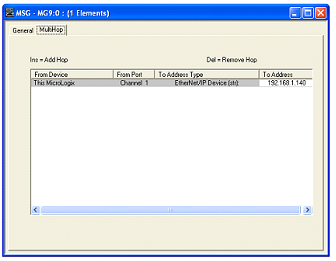
In Rung 1, the one second timer is used to trigger the message instruction to the EtherMeter. A double left click on the “Setup Screen” button of the MSG Block causes a popup window to appear.

Within the popup window, first the general tab should be selected, and the parameters on its page should be entered as instruction.

Under the “This Controller” heading, note that the selected channel is “Channel 1 (Integral)”, which corresponds to the MicroLogix’s Ethernet port. The Selected “Communication Command” is “500CPU read”, as the EthernetMeter an S:C/500.The selected target data table address within the MicroLogix is N7:0, although a different memory location could be chosen. The “Size in Elements” is entered as “8” (8 x 16 bit words).

Under the “Target Device” heading, note that the “Data Table Address” is entered as N7:0, as this is the desired beginning memory location within the EtherMeter. For the completed memory map of the EtherMeter. “Local” should be selected. For routing file, R110:0 is entered, although an alternate Routing Information file could be chosen.
Data Table Address

BCD instruction on Omron PLC


BCD instruction on Omron PLC : Binary-To-BCD.
Purpose:
BCD(101) converts the binary (hexadecimal) contents of S into the numerically equivalent BCD bits and outputs the BCD bits to R. Only the contents of R is changed; the contents of S is left unchanged.

BCD(101) can be used to convert binary to BCD so that displays on SYSWIN, the Programming Console or any other programming device will appear in decimal rather than hexadecimal. It can also be used to convert to BCD to perform BCD arithmetic operations rather than binary arithmetic operations, for example, when BCD and binary values must be added.
Range:
S: Source word CIO, G, A, T, C, DM, DR, IR
R: Result word CIO, G, A, DM, DR, IR

BCD instructions
illustration of BCD instructions on Omron PLC:
Binary Convert to BCD

Binary Convert to BCD

Configuring EtherMeter – MicroLogix 1100/1400


This article will describe to the Allen Bradley Micrologix PLC (1100 or 1400) user who wishes to connect to an EtherMeter using the Ethernet/IP protocol. When creating an Ethernet/IP client/server connection between an Allen Bradley Micrologix 1100 or 1400 PLC (client) and an EtherMeter (server), no special set up is generally required within the EtherMeter’s set up menu. The EtherMeter features an ‘always on’ Ethernet/IP server on TCP logical port 44818 and it is configured to auto detect and service incoming client requests from MicroLogix 1100 and 1400 PLC’s. To simplify integration into an Ethernet/IP network, the EtherMeter emulates a SLC/500 series PLC.

1. Wiring Configuration.
In this example, the Ethernet ports on the MicroLogix and EtherMeter are wired directly to each other, without an Ethernet switch, using a single Ethernet crossover cable. Alternatively, the Ethernet ports of both the MicroLogix and EtherMeter could be connected to a common Ethernet switch if expanded network connectivity is desired.

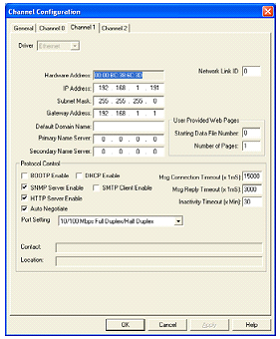
2. MicroLogix Ethernet Port (Port 1) Configuration.
Within a MicroLogix PLC, communication setup is performed within the RsLogix Programming environment. To begin the setup, a new programming project should be initialized in RsLogix using the appropriate selections for processor type, version, and serial port setup. For brevity, the details of these steps have been omitted.

It is important to note that the default static IP address of the EtherMeter is 192.168.1.140.
default static IP address

ANDW instruction on Omron PLC


ANDW instruction on Omron PLC : ANDW(130) logically ANDs the contents of I1 and I2 bit-by-bit and places the result in R.
Operand Data Areas:
I1: Input 1 CIO, G, A, T, C, DM, #, DR, IR
I2: Input 2 CIO, G, A, T, C, DM, #, DR, IR
R: Result word CIO, G, A, DM, DR, IR

ANDW instructions
illustration of ANDW instructions on Omron PLC:
ANDW Decimal #240

ANDW Decimal 240

Configuration of PLC Interfaces for PL Series


The PLC system is used with and external PLC controller, PLC indexer card, or other device in positioning applications. The input connector supports controller input signals and the Limit Loop safety.

The PLC series supports 4 types of interfaces:
1. PD Sinking Style (SN). The PD SN is for +5V interfaces in which the PLC will sink the output signals (step & direction) to ground when active. The P1-4 pin of the connector will source +5V supply for the PLC card and the optical interface.

2. PB Sourcing Style (SO). The PB SO is for +5V interfaces in which the PLC will source the output signals (step & direction) to +5V when active. . The P1-4 pin of the connector will source +5V supply for the PLC card and the optical interface.

3. PL Sinking Style (SN). The PL SN is for +24V interfaces in which the PLC will sink the output signals (step & direction) to ground. The P1-4 pin of the connector must be connected to the source of +24V for the optical interface.

4. PL Sourcing Style (SO). The PL SO is for +24V interfaces in which the PLC will source the output signals (step & direction) to +24V. The P1-1 pin of the connector must be connected to the return (ground) of the source of the 24V for the optical interface.

DEC instruction on Omron PLC


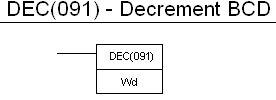
DEC instruction on Omron PLC : Decrement BCD
Decrements the memory data specified by the operand by 1.
Variations: Differentiate Up DEC
Purpose:
DEC(091) decrements Wd, without affecting CY.
Further information can be found in BCD calculations.
Operand Data Areas:
Wd: Decrement word CIO, G, A, DM, DR, IR

DEC instructions
make Ladder Diff.Up DEC :

DEC ladder Omron

EZPLC the Powerful Ladder Programming


EZPLC is the most innovative PLC in its class. It is packed with power only found in high end PLC’s. It’s also support most flexible I/O in industry.

The EZPLC supports 32-bit floating point mathematical and logical operations. The data options allow you to use signed or unsigned integer data as well as floating point data type.

This instruction is meant to make ladder programming EZ and flexible. You can copy the data in one register, convert its data type and save it into another register without altering the ‘source’ register. The data can be converted from binary to BCD or grey code or vice versa.

Move block instruction adds convenience to handling data inside the ladder program. You can move block of memory. All you need to specify is starting point of your source address, number of data elements to move and starting point of destination memory address. Along with Move Block, Fill Block and Move table of Constants also make life of a programmer much simple.

You can Move string data between registers, base rung power flow upon string comparison and compute string length to store the length value in different register. Capability to use subroutines is a huge plus in EZPLC programming.

Time base of each count is user defined and each step has its counter. User can define an event to trigger the count. The rung power flow is allowed after completion aft all the steps in a drum.

Nano PLCs Editor FTX 117 Terminal


The FTX 117 dedicated terminal is the instruction list language programming tool for Nano PLCs. It is easy to use due to its back-lit screen with 4 lines of 16 characters and 35-key keypad for contextual entry.
The FTX 117 terminal can be powered in two different ways:
• By a 100 to 200VAC mains supply or 200 to 240 VAC supply via FTX ADC 1.
• Adaptor, in which case the terminal must be used in offline mode.
• By the Nano PLC, in which case the priority operating mode of the terminal is online mode.

There are rapid operations in Nano PLCs which are necessary function for writing, debugging, transferring, and archiving programs are accessible at any time as there are 5 editors which display the menus. They are:
1. TSX: shows the menus for:
• Displaying the RUN/STOP status of the PLC.
• Running or Stopping the PLC
• Initializing the PLC memory.
• Displaying and entering the real-time clock parameters.
• Setting the PLC integral clock.

2. Prg: program editor designed for:
• Reading, writing and modifying the program using duplication, search, replacement functions, etc.
• Partially or completely clearing the application memory.
• Debugging program.
• Transferring and archiving applications.
• Program diagnostic using a consistency check.

3. Dat: Data editor for:
• Accessing the set of variables in real-time display.
• Modifying or forcing authorized variables.
• Converting word objects into hexadecimal, ASCII or decimal code.

4. Cnf: configuration editor for:
• Entering application parameters.
• Entering I/O and function block parameters.
• Entering constant word.

5. FTX: terminal editor for entering terminal parameters (language, sound, keyboard, screen saver).

Hardware Connections of EMBEDDED PLC


The hardware connections of EMBEDDED PLC are as following:
1. Connect power supply
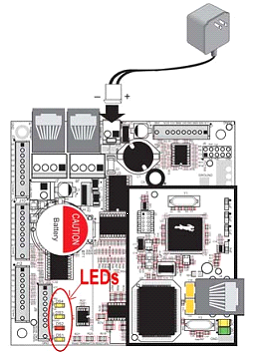
Connect the AC adapter to header J2, match the friction lock tab on the friction lock connector to the back of header J2 on the Bl2500. DS1 (yellow) and DS2 (red) LEDs indicate the Firmware Kernel status after the board has been power up. If after 10 seconds DS2 (red) is turned off and DS1 (yellow) start blinking, the Firmware Kernel is licensed and active.
Connect power supply
2. Connect Ethernet cable
The BL2500 comes pre-configured to use TCP/IP protocol and with the following settings:
IP address: 192.168.1.100
Netmask: 255.0.0.0
Default Gateway: 192.168.1.1.
Use the Ethernet crossover cabled supplied in this Kit to connect the RJ-45 Ethernet port on the BL2500 (header J4 on the RabbitCore module) to the RJ-45 Ethernet port on your PC. If your target PC is currently connected to a LAN, disconnect it and connect the Ethernet crossover cable between the BL2500 target and your PC.

To configure the PC with IP address and Netmask follow these instructions:
a. Go to Control Panel (Start button-->Settings-->Control Panel) and start Network Connections.
b. Select Local Area Connection and choose Properties.
Local Area Connection
c. Select Internet Protocol (TCP/IP) and press Properties button.
d. Click on Use the following IP Address and fill in the following fields:
IP Address
e. Press OK button to close the Internet Protocol (TCP/IP) properties window. Press OK button to close the Local Area Connections Properties and to update the new TCP/IP values.
f. To verify the communication between your PC and BL2500 use the Ping command. Open a Command prompt window (Start button --> Programs --> Accessories --> Command prompt) and type C:\Ping 192.168.1.100.
communication between PC and BL2500

EMBEDDED PLC to Program Single Board Computer


EMBEDDED PLC Application Kit is tools to program the BL2500 Single Board Computer (SBC) via ISaGRAF Soft Logic Package. This article will help you to quickly install the necessary software to run a PLC sample application on the BL2500 target using the ISaGRAF Workbench.

The EBEDDED PLC system turns a Rabbit Single Board Computer, such as the Coyote BL2500, into a high performance and yet inexpensive PLC. The PLC can be programmed using the automation control programming languages IEC 61131-3: Sequential Function Chart (SFC), Function Block Diagram (FBD), Ladder Diagram (LD), Structured Text (ST) and Instruction List (IL).

The Single Board Computer, or the target, comes pre-loaded with the EMBEDDED PLC Firmware Kernel which executes the application generated by the ISaGRAF Workbench. The Firmware Kernel also provides the communication interface between the target and workbench.

To install the software you need to insert EMBEDDED PLC BL2500 CD-ROM and install the ISaGRAF Workbench V3.50:
1. Open ISaGRAF_V3.50 folder and double click on ISaGRAF.EXE to launch the ISaGRAF installation wizard. Follow the instructions provided by the wizard to proceed with the installation.
2. Once all the ISaGRAF files have been copied, the ISaGRAF Project Manager icon is added to your desktop and the ISaGRAF Program Group is added to your main program group.

Install the EMBEDDED PLC Board Support Package for BL2500:
1. Go back to root directory of the CD-ROM, open BL2500C_BSP_V1.04_9-0003-006\IsaGRAF folder and double click on INSTALL.EXE to launch the ISaGRAF installation wizard.
2. Enter the location where the ISaGRAF Workbench was installed and press Install button. Their installation wizard will update the ISaGRAF directory with the I/O boards, functions, C function blocks and sample application for the EMBEDDED PLC BL2500 target.
Sponsored Links :

ALL ARTICLES
SUBSCRIBE BY EMAIL:

Delivered by FeedBurner


PLC Simulation Update

Popular Posts

Free Download PLC

Custom Search
Copyright © PLC Ladder